

如果文章中代码不便于阅读,请使用电脑查看或点击阅读原文。
0 开发环境
-
JDK:1.8
-
Spring Boot:2.7.18
1 导入依赖
<dependency> <groupId>org.springframework.boot</groupId> <artifactId>spring-boot-starter-data-redis</artifactId></dependency>
2 配置连接
spring: redis: host: 127.0.0.1 port: 6379
代码中默认host是localhost,默认port是6379
3 测试
3.1 新建启动类
@SpringBootApplicationpublic class RedisApplication { public static void main(String[] args) { SpringApplication.run(RedisApplication.class, args); }}
3.2 新建测试类
@SpringBootTest(classes = RedisApplication.class, webEnvironment = SpringBootTest.WebEnvironment.DEFINED_PORT)public class RedisApplicationTest { @Autowired private RedisTemplate redisTemplate; @Test public void contextLoads() { redisTemplate.opsForValue().set("test_key", "test_value"); System.out.println(redisTemplate.opsForValue().get("test_key")); }}
3.3 测试
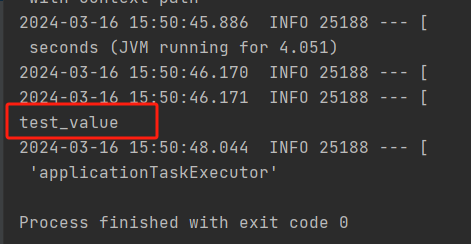
启动测试类,成功保存并取出打印
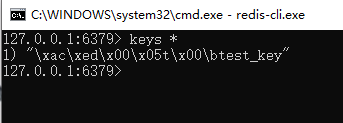
启动Redis客户端,查看数据,保存成功。
这里数据有乱码,是因为默认的序列化方式是JDK序列化,后面我们可以使用Json来序列化解决该问题。
4 对象序列化
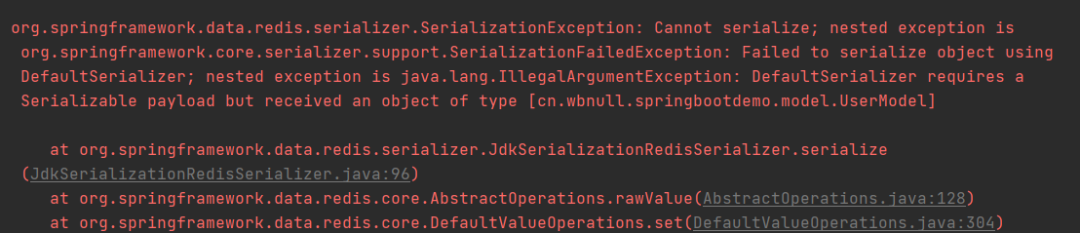
在开发中,所有的对象存储到Redis中都需序列化
4.1 新建UserModel
/** * 未序列化,错误示范 */@Data@AllArgsConstructor@NoArgsConstructorpublic class UserModel { private int id; private String name;}
4.2 调整测试类
@Test public void contextLoadsUser() { UserModel user = new UserModel(1, "测试姓名"); redisTemplate.opsForValue().set("test_user", user); System.out.println(redisTemplate.opsForValue().get("test_user")); }
4.3 测试
启动测试类,程序报错
4.4 调整UserModel
@Data@AllArgsConstructor@NoArgsConstructorpublic class UserModel implements Serializable { private int id; private String name;}
4.5 测试
再次启动测试类,数据成功保存并取出打印
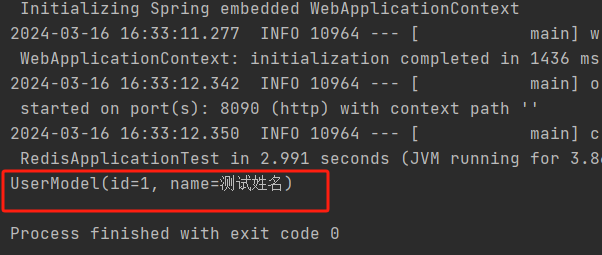
这样,我们就能保存字符串和Java对象了。
然后针对前面所说的数据乱码问题,我们可以自定义RedisTemplate
5 自定义RedisTemplate
@Configurationpublic class RedisConfig { @Bean public RedisTemplate<String, Object> redisTemplate(RedisConnectionFactory redisConnectionFactory) throws UnknownHostException { RedisTemplate<String, Object> template = new RedisTemplate<>(); template.setConnectionFactory(redisConnectionFactory); //JSON序列化配置 ObjectMapper objectMapper = new ObjectMapper(); objectMapper.setVisibility(PropertyAccessor.ALL, JsonAutoDetect.Visibility.ANY); objectMapper.enableDefaultTyping(ObjectMapper.DefaultTyping.NON_FINAL); Jackson2JsonRedisSerializer<Object> jackson2JsonRedisSerializer = new Jackson2JsonRedisSerializer<>(Object.class); jackson2JsonRedisSerializer.setObjectMapper(objectMapper); //String序列化配置 StringRedisSerializer stringRedisSerializer = new StringRedisSerializer(); //key采用String的序列化方式 template.setKeySerializer(stringRedisSerializer); //hash的key采用String的序列化方式 template.setHashKeySerializer(stringRedisSerializer); //value序列化方式采用jackson template.setValueSerializer(jackson2JsonRedisSerializer); //hash的value序列化方式采用jackson template.setHashValueSerializer(jackson2JsonRedisSerializer); template.afterPropertiesSet(); //开启事务 template.setEnableTransactionSupport(true); return template; }}
6 测试
6.1 调整测试类
@SpringBootTest(classes = RedisApplication.class, webEnvironment = SpringBootTest.WebEnvironment.DEFINED_PORT)public class RedisApplicationTest { @Autowired @Qualifier("redisTemplate") private RedisTemplate redisTemplate; @Test public void contextLoads() { redisTemplate.opsForValue().set("test_key", "test_value"); System.out.println(redisTemplate.opsForValue().get("test_key")); }}
6.2 测试
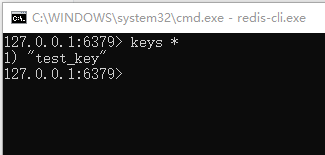
Redis客户端中执行flushdb清空数据,再次执行刚才的测试类,客户端中查看数据,数据保存成功,且无乱码
但是在实际开发中,我们基本是不会使用原生的方法来存取数据的,形如redisTemplate.opsForValue().set()编写代码比较麻烦。
通常,我们会自定义工具类,后续操作数据都通过工具类来处理。
7 自定义工具类
@Componentpublic class RedisUtils { @Autowired private RedisTemplate<String, Object> redisTemplate; /** * 指定缓存失效时间 * * @param key 键 * @param timeout 时间(秒) * @return */ public boolean expire(String key, long timeout) { try { if (timeout > 0) { redisTemplate.expire(key, timeout, TimeUnit.SECONDS); } return true; } catch (Exception e) { e.printStackTrace(); return false; } } /** * 根据key获取过期时间 * * @param key 键 不能为null * @return 时间(秒) 0 永久有效 */ public long getExpire(String key) { return redisTemplate.getExpire(key, TimeUnit.SECONDS); } /** * 判断key是否存在 * * @param key 键 * @return true 存在 false 不存在 */ public boolean hasKey(String key) { if (StringUtils.isEmpty(key)) { return false; } try { return Boolean.TRUE.equals(redisTemplate.hasKey(key)); } catch (Exception e) { e.printStackTrace(); return false; } } /** * 普通缓存获取 * * @param key 键 * @return 值 */ public Object get(String key) { return key == null ? null : redisTemplate.opsForValue().get(key); } /** * 普通缓存放入 * * @param key 键 * @param value 值 * @return true 成功 false 失败 */ public boolean set(String key, Object value) { try { redisTemplate.opsForValue().set(key, value); return true; } catch (Exception e) { e.printStackTrace(); return false; } } /** * 普通缓存放入并设置时间 * * @param key 键 * @param value 值 * @param timeout 时间(秒) time要大于0,如果time小于等于0,将设置无限期 * @return true 成功 false 失败 */ public boolean set(String key, Object value, long timeout) { try { if (timeout <= 0) { return set(key, value); } redisTemplate.opsForValue().set(key, value, timeout, TimeUnit.SECONDS); return true; } catch (Exception e) { e.printStackTrace(); return false; } } /** * 删除缓存 * * @param keys 可以传一个值或多个 */ public void delete(String... keys) { if (keys == null || keys.length <= 0) { return; } if (keys.length == 1) { redisTemplate.delete(keys[0]); } else { redisTemplate.delete((Collection<String>) CollectionUtils.arrayToList(keys)); } } /** * 递增 * * @param key * @param delta * @return * @throws Exception */ public long increment(String key, long delta) { if (delta < 0) { throw new RuntimeException("递增因子必须 > 0"); } return redisTemplate.opsForValue().increment(key, delta); } /** * 递减 * * @param key * @param delta * @return * @throws Exception */ public long decrement(String key, long delta) { if (delta < 0) { throw new RuntimeException("递减因子必须 > 0"); } return redisTemplate.opsForValue().increment(key, -delta); } /** * 判断hash表中是否有该项的值 * * @param key 键 不能为null * @param hashKey 项 不能为null * @return true 存在 false 不存在 */ public boolean hasKeyHash(String key, String hashKey) { return Boolean.TRUE.equals(redisTemplate.opsForHash().hasKey(key, hashKey)); } /** * 获取缓存 * * @param key 键 不能为null * @param hashKey 项 不能为null * @return 值 */ public Object getHash(String key, String hashKey) { return key == null ? null : redisTemplate.opsForHash().get(key, hashKey); } /** * 向一张hash表中放入数据,如果不存在将创建 * * @param key 键 * @param hashKey 项 * @param value 值 * @return true 成功 false失败 */ public boolean setHash(String key, String hashKey, Object value) { try { redisTemplate.opsForHash().put(key, hashKey, value); return true; } catch (Exception e) { e.printStackTrace(); return false; } } /** * 向一张hash表中放入数据,如果不存在将创建 * * @param key 键 * @param hashKey 项 * @param value 值 * @param timeout 时间(秒) 注意:如果已存在的hash表有时间,这里将会替换原有的时间 * @return true 成功 false 失败 */ public boolean setHash(String key, String hashKey, Object value, long timeout) { try { redisTemplate.opsForHash().put(key, hashKey, value); if (timeout > 0) { expire(key, timeout); } return true; } catch (Exception e) { e.printStackTrace(); return false; } } /** * 删除hash表中的值 * * @param key 键 不能为null * @param hashKeys 项 可以是多个 不能为null */ public void deleteHash(String key, Object... hashKeys) { redisTemplate.opsForHash().delete(key, hashKeys); } /** * 递增 * * @param key * @param hashKey * @param delta * @return */ public long incrementHash(String key, String hashKey, long delta) { return redisTemplate.opsForHash().increment(key, hashKey, delta); } /** * 递增 * * @param key * @param hashKey * @param delta * @return */ public double incrementHash(String key, String hashKey, double delta) { return redisTemplate.opsForHash().increment(key, hashKey, delta); } /** * 递减 * * @param key * @param hashKey * @param delta * @return */ public long decrementHash(String key, String hashKey, long delta) { return redisTemplate.opsForHash().increment(key, hashKey, -delta); } /** * 递减 * * @param key * @param hashKey * @param delta * @return */ public double decrementHash(String key, String hashKey, double delta) { return redisTemplate.opsForHash().increment(key, hashKey, -delta); } /** * 获取key对应的所有键值 * * @param key 键 * @return 对应的多个键值 */ public Map<Object, Object> getHash(String key) { return key == null ? null : redisTemplate.opsForHash().entries(key); } /** * 缓存 * * @param key 键 * @param map 对应多个键值 * @return true 成功 false 失败 */ public boolean setHash(String key, Map<String, Object> map) { try { redisTemplate.opsForHash().putAll(key, map); return true; } catch (Exception e) { e.printStackTrace(); return false; } } /** * 缓存并设置超时时间 * * @param key 键 * @param map 对应多个键值 * @param timeout 时间(秒) * @return true 成功 false 失败 */ public boolean setHash(String key, Map<String, Object> map, long timeout) { try { redisTemplate.opsForHash().putAll(key, map); if (timeout > 0) { expire(key, timeout); } return true; } catch (Exception e) { e.printStackTrace(); return false; } } /** * 根据key获取Set中的所有值 * * @param key 键 * @return */ public Set<Object> membersSet(String key) { try { return redisTemplate.opsForSet().members(key); } catch (Exception e) { e.printStackTrace(); return null; } } /** * 根据value从一个set中查询,是否存在 * * @param key 键 * @param value 值 * @return true 存在 false 不存在 */ public boolean isMemberSet(String key, Object value) { try { return Boolean.TRUE.equals(redisTemplate.opsForSet().isMember(key, value)); } catch (Exception e) { e.printStackTrace(); return false; } } /** * 将数据放入set缓存 * * @param key 键 * @param values 值 可以是多个 * @return 成功个数 */ public long addSet(String key, Object... values) { try { return redisTemplate.opsForSet().add(key, values); } catch (Exception e) { e.printStackTrace(); return 0; } } /** * 将set数据放入缓存 * * @param key 键 * @param timeout 时间(秒) * @param values 值 可以是多个 * @return 成功个数 */ public long addSet(String key, long timeout, Object... values) { try { Long count = redisTemplate.opsForSet().add(key, values); if (timeout > 0) { expire(key, timeout); } return count; } catch (Exception e) { e.printStackTrace(); return 0; } } /** * 获取set缓存的长度 * * @param key 键 * @return */ public long sizeSet(String key) { try { return redisTemplate.opsForSet().size(key); } catch (Exception e) { e.printStackTrace(); return 0; } } /** * 移除值为value的 * * @param key 键 * @param values 值 可以是多个 * @return 移除的个数 */ public long removeSet(String key, Object... values) { try { return redisTemplate.opsForSet().remove(key, values); } catch (Exception e) { e.printStackTrace(); return 0; } } /** * 获取list缓存的内容 * * @param key 键 * @param start 开始 * @param end 结束 0到-1代表所有值 * @return */ public List<Object> rangeList(String key, long start, long end) { try { return redisTemplate.opsForList().range(key, start, end); } catch (Exception e) { e.printStackTrace(); return null; } } /** * 获取list缓存的长度 * * @param key 键 * @return */ public long sizeList(String key) { try { return redisTemplate.opsForList().size(key); } catch (Exception e) { e.printStackTrace(); return 0; } } /** * 通过索引获取list中的值 * * @param key 键 * @param index 索引 index>=0时,0 表头,1 第二个元素,依次类推;index<0时,-1,表尾,-2倒数第二个元素,依次类推 * @return */ public Object indexList(String key, long index) { try { return redisTemplate.opsForList().index(key, index); } catch (Exception e) { e.printStackTrace(); return null; } } /** * 将list放入缓存 * * @param key 键 * @param value 值 * @return */ public boolean rightPushList(String key, Object value) { try { redisTemplate.opsForList().rightPush(key, value); return true; } catch (Exception e) { e.printStackTrace(); return false; } } /** * 将list放入缓存 * * @param key 键 * @param value 值 * @param timeout 时间(秒) * @return */ public boolean rightPushList(String key, Object value, long timeout) { try { redisTemplate.opsForList().rightPush(key, value); if (timeout > 0) { expire(key, timeout); } return true; } catch (Exception e) { e.printStackTrace(); return false; } } /** * 将list放入缓存 * * @param key 键 * @param value 值 * @return */ public boolean rightPushList(String key, List<Object> value) { try { redisTemplate.opsForList().rightPushAll(key, value); return true; } catch (Exception e) { e.printStackTrace(); return false; } } /** * 将list放入缓存 * * @param key 键 * @param value 值 * @param timeout 时间(秒) * @return */ public boolean rightPushList(String key, List<Object> value, long timeout) { try { redisTemplate.opsForList().rightPushAll(key, value); if (timeout > 0) { expire(key, timeout); } return true; } catch (Exception e) { e.printStackTrace(); return false; } } /** * 根据索引修改list中的某条数据 * * @param key 键 * @param index 索引 * @param value 值 * @return */ public boolean setList(String key, long index, Object value) { try { redisTemplate.opsForList().set(key, index, value); return true; } catch (Exception e) { e.printStackTrace(); return false; } } /** * 移除N个值为value的数据 * * @param key 键 * @param count 移除多少个 * @param value 值 * @return 移除的个数 */ public long removeList(String key, long count, Object value) { try { return redisTemplate.opsForList().remove(key, count, value); } catch (Exception e) { e.printStackTrace(); return 0; } }}
8 测试
8.1 调整测试类
@SpringBootTest(classes = RedisApplication.class, webEnvironment = SpringBootTest.WebEnvironment.DEFINED_PORT)public class RedisApplicationTest { @Autowired private RedisUtils redisUtils; @Test public void contextLoadsUtil() { redisUtils.set("test_utils_key", "test_utils_value"); System.out.println(redisUtils.get("test_utils_key")); }}
8.2 测试
启动测试类,成功保存并取出打印
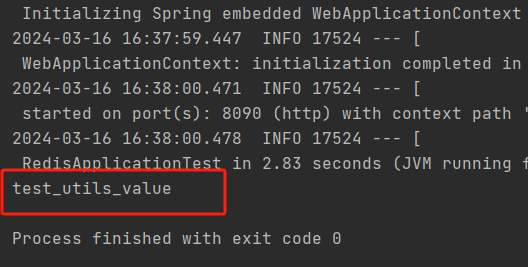
至此,Spring Boot整合Redis完成且测试通过,可以看到,对于Redis的相关操作还是比较简单的,关键在于理解Redis的思想和每一种数据结构的用法和作用场景。
CSDN:https://blog.csdn.net/dkbnull/article/details/137062282
本篇文章来源于微信公众号: 程序员null
微信扫描下方的二维码阅读本文

Comments NOTHING