

之前也写过一篇java基础版的邮件验证码,这篇是采用hutool,ftl模板,结合redis做的一篇带有有效期的验证码的实现方案。
首先是pom依赖:
<dependency><groupId>org.springframework.boot</groupId><artifactId>spring-boot-starter-data-redis</artifactId><version>2.6.1</version></dependency><dependency><groupId>org.apache.velocity</groupId><artifactId>velocity-engine-core</artifactId><version>2.2</version></dependency><dependency><groupId>com.sun.mail</groupId><artifactId>javax.mail</artifactId><version>1.6.2</version></dependency><dependency><groupId>org.springframework.boot</groupId><artifactId>spring-boot-starter-freemarker</artifactId><version>2.3.12.RELEASE</version>
</dependency>再就是hutool all 5.8版本依赖,
然后就是配置文件,主要是邮箱配置以及模板配置:
spring:freemarker:: true: classpath:/templatesprofiles:active: devmail:email: xxxx@163.comhost: smtp.163.comport: 465: xxxxx #邮箱@前缀部分,比如手机号啥的# 授权密码, 非邮箱密码,授权码是用于登录第三方邮件客户端的专用密码。password: xxxxxxx#邮箱验证码有效时间/秒code:expiration: 300
因为用到了redis,所以上面配置也是需要配置redis配置,我是用的本地,redis配置类RedisConfig:
import com.alibaba.fastjson.JSON;import com.alibaba.fastjson.parser.ParserConfig;import com.alibaba.fastjson.support.spring.FastJsonRedisSerializer;import org.apache.commons.codec.digest.DigestUtils;import org.springframework.boot.autoconfigure.condition.ConditionalOnClass;import org.springframework.boot.autoconfigure.data.redis.RedisProperties;import org.springframework.boot.context.properties.EnableConfigurationProperties;import org.springframework.cache.annotation.CachingConfigurerSupport;import org.springframework.cache.annotation.EnableCaching;import org.springframework.cache.interceptor.KeyGenerator;import org.springframework.context.annotation.Bean;import org.springframework.context.annotation.Configuration;import org.springframework.data.redis.cache.RedisCacheConfiguration;import org.springframework.data.redis.connection.RedisConnectionFactory;import org.springframework.data.redis.core.RedisOperations;import org.springframework.data.redis.core.RedisTemplate;import org.springframework.data.redis.serializer.RedisSerializationContext;import org.springframework.data.redis.serializer.StringRedisSerializer;import java.time.Duration;import java.util.HashMap;import java.util.Map;/*** Redis配置类* @author ly* @date 2023-02-21*/(RedisOperations.class)(RedisProperties.class)public class RedisConfig extends CachingConfigurerSupport {/***设置 redis 数据默认过期时间*/public RedisCacheConfiguration redisCacheConfiguration(){FastJsonRedisSerializer<Object> fastJsonRedisSerializer = new FastJsonRedisSerializer<>(Object.class);RedisCacheConfiguration configuration = RedisCacheConfiguration.defaultCacheConfig();configuration = configuration.serializeValuesWith(RedisSerializationContext.SerializationPair.fromSerializer(fastJsonRedisSerializer)).entryTtl(Duration.ofHours(Constant.CACHE_TIMEOUT_HOUR));return configuration;}public RedisTemplate<Object, Object> redisTemplate(RedisConnectionFactory redisConnectionFactory) {RedisTemplate<Object, Object> template = new RedisTemplate<>();template.setConnectionFactory(redisConnectionFactory);FastJsonRedisSerializer fastJsonRedisSerializer = new FastJsonRedisSerializer(Object.class);template.setValueSerializer(fastJsonRedisSerializer);template.setHashValueSerializer(fastJsonRedisSerializer);ParserConfig.getGlobalInstance().setAutoTypeSupport(true);template.setKeySerializer(new StringRedisSerializer());template.setHashKeySerializer(new StringRedisSerializer());template.afterPropertiesSet();return template;}/*** 参考:https://blog.csdn.net/qq_15071263/article/details/84335632* 自定义缓存key生成策略,默认将使用该策略*/public KeyGenerator keyGenerator() {return (target, method, params) -> {Map<String,Object> container = new HashMap<>(3);Class<?> targetClassClass = target.getClass();// 类地址container.put("class",targetClassClass.toGenericString());// 方法名称container.put("methodName",method.getName());// 包名称container.put("package",targetClassClass.getPackage());// 参数列表for (int i = 0; i < params.length; i++) {container.put(String.valueOf(i),params[i]);}// 转为JSON字符串String jsonString = JSON.toJSONString(container);// 做SHA256 Hash计算,得到一个SHA256摘要作为Keyreturn DigestUtils.sha256Hex(jsonString);};}}
redis工具类RedisUtils:
import lombok.AllArgsConstructor;import org.springframework.data.redis.core.RedisTemplate;import org.springframework.stereotype.Component;import java.util.concurrent.TimeUnit;/*** Redis工具类** @author ly* @date 2023-02-23*/public class RedisUtils {private RedisTemplate<Object, Object> redisTemplate;/*** 普通获取键对应值** @param key 键* @return 值*/public Object get(String key) {return key == null ? null : redisTemplate.opsForValue().get(key);}/*** 普通设置键值** @param key 键* @param value 值* @return true成功 false失败*/public boolean set(String key, Object value) {try {redisTemplate.opsForValue().set(key, value);return true;} catch (Exception e) {return false;}}/*** 普通设置键值并设置过期时间** @param key 键* @param value 值* @param time 时间(秒) time要大于0 如果time小于等于0 将设置无限期* @return true成功 false 失败*/public boolean set(String key, Object value, long time) {try {if (time > 0) {redisTemplate.opsForValue().set(key, value, time, TimeUnit.SECONDS);} else {set(key, value);}return true;} catch (Exception e) {return false;}}/*** 删除缓存** @param key 键* @return 是否成功*/public boolean del(String key) {return redisTemplate.delete(key);}/*** 指定缓存的失效时间** @param key 键值 @NotNull* @param time 时间(秒) @NotNull*/public boolean expire(String key, long time) {try {if (time > 0) {redisTemplate.expire(key, time, TimeUnit.SECONDS);}} catch (Exception e) {e.printStackTrace();return false;}return true;}}
controller类:
("发送邮件")("/sendToEmail")public void queryPageList(HttpServletRequest request) throws BizException {String email = request.getParameter("email");userManagerService.sendToEmail(email);}
实现类userManagerServiceImpl:
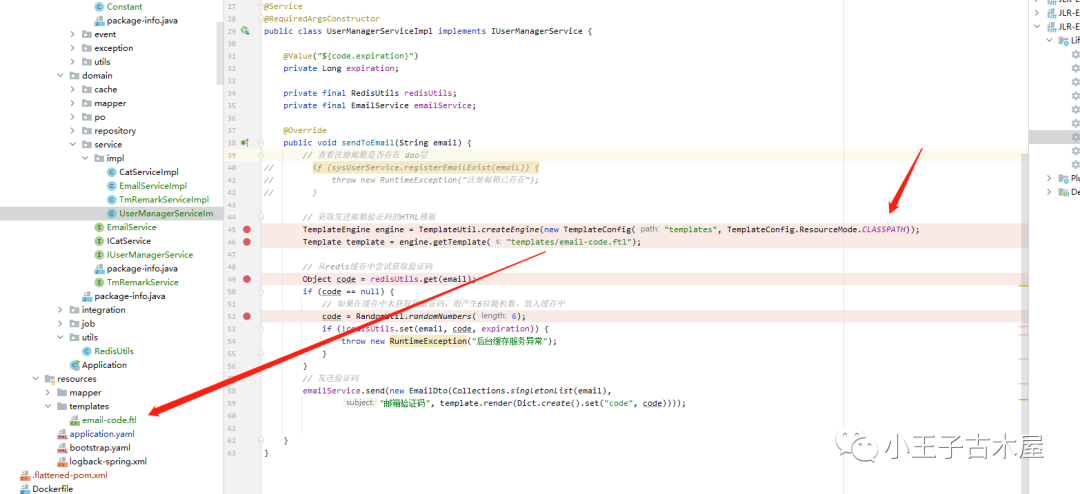
import cn.hutool.core.lang.Dict;import cn.hutool.core.util.RandomUtil;import cn.hutool.extra.template.Template;import cn.hutool.extra.template.TemplateConfig;import cn.hutool.extra.template.TemplateEngine;import cn.hutool.extra.template.TemplateUtil;import lombok.RequiredArgsConstructor;import org.springframework.beans.factory.annotation.Value;import java.util.Collections;/*** <p>* 领域服务层实现类* </p>** @author ly* @since 2023-02-22*/@Service@RequiredArgsConstructorpublic class UserManagerServiceImpl implements IUserManagerService {@Value("${code.expiration}")private Long expiration;private final RedisUtils redisUtils;private final EmailService emailService;@Overridepublic void sendToEmail(String email) {// 查看注册邮箱是否存在 dao层// if (sysUserService.registerEmailExist(email)) {// throw new RuntimeException("注册邮箱已存在");// }// 获取发送邮箱验证码的HTML模板TemplateEngine engine = TemplateUtil.createEngine(new TemplateConfig("templates", TemplateConfig.ResourceMode.CLASSPATH));Template template = engine.getTemplate("templates/email-code.ftl");// 从redis缓存中尝试获取验证码Object code = redisUtils.get(email);if (code == null) {// 如果在缓存中未获取到验证码,则产生6位随机数,放入缓存中code = RandomUtil.randomNumbers(6);if (!redisUtils.set(email, code, expiration)) {throw new RuntimeException("后台缓存服务异常");}}// 发送验证码emailService.send(new EmailDto(Collections.singletonList(email),"邮箱验证码", template.render(Dict.create().set("code", code))));}}
EmailDto:
import lombok.AllArgsConstructor;import lombok.Data;import lombok.NoArgsConstructor;import javax.validation.constraints.NotBlank;import javax.validation.constraints.NotEmpty;import java.util.List;/*** 邮件信息* @author ly* @date 2023-02-25*/public class EmailDto {/*** 发送邮箱列表*/private List<String> tos;/*** 主题*/private String subject;/*** 内容*/private String content;}
Emservice接口:
/*** 邮箱服务接口* @author ly* @date 2023-02-19*/public interface EmailService {/*** 发送邮件* @param emailDto 邮箱列表*/void send(EmailDto emailDto);}
EmailService接口实现类emailServiceImpl:
import cn.hutool.extra.mail.Mail;import cn.hutool.extra.mail.MailAccount;import lombok.RequiredArgsConstructor;import lombok.extern.slf4j.Slf4j;import org.springframework.beans.factory.annotation.Value;import org.springframework.stereotype.Service;import org.springframework.transaction.annotation.Propagation;import org.springframework.transaction.annotation.Transactional;/*** 邮箱接口实现类* @author ly* @date 2023-02-19*/public class EmailServiceImpl implements EmailService {private String email;private String host;private String port;private String username;private String password;public void send(EmailDto emailDto) {// 读取邮箱配置if (email == null || host == null || port == null || username == null || password == null) {throw new RuntimeException("邮箱配置异常");}// 设置MailAccount account = new MailAccount();account.setHost(host);account.setPort(Integer.parseInt(port));// 设置发送人邮箱account.setFrom(username + "<" + email + ">");// 设置发送人名称account.setUser(username);// 设置发送授权码account.setPass(password);account.setAuth(true);// ssl方式发送account.setSslEnable(true);// 使用安全连接account.setStarttlsEnable(true);// 发送邮件try {int size = emailDto.getTos().size();Mail.create(account).setTos(emailDto.getTos().toArray(new String[size])).setTitle(emailDto.getSubject()).setContent(emailDto.getContent()).setHtml(true)//关闭session.setUseGlobalSession(false).send();} catch (Exception e) {throw new RuntimeException(e.getMessage());}}}
constant常量维护:
/*** 常量类* @author ly* @date 2023-02-07*/public class Constant {/*** 定义Redis缓存默认过期时间*/public static final int CACHE_TIMEOUT_HOUR=2;/*** 定义unknown字串串的常量*/public static final String UNKNOWN = "unknown";/*** 定义MB的计算常量*/public static final int MB = 1024 * 1024;/*** 定义KB的计算常量*/public static final int KB = 1024;}
ftl模板内容:
<html xmlns="http://www.w3.org/1999/xhtml"><head><meta http-equiv="Content-Type" content="text/html; charset=UTF-8"/><style>@page {margin: 0;}</style></head><body><div class="header"><div style="padding: 10px;padding-bottom: 0px;"><p style="margin-bottom: 10px;padding-bottom: 0px;">尊敬的用户,您好:</p><p style="text-indent: 2em; margin-bottom: 10px;">您正在申请邮箱验证,您的验证码为:</p><p class="code-text">${code}</p><p style="text-indent: 2em; margin-bottom: 10px;">此次验证码5分钟内有效</p><div class="footer"></div></div></div></body></html><style lang="css">body {margin: 0px;padding: 0px;font: 100% SimSun, Microsoft YaHei, Times New Roman, Verdana, Arial, Helvetica, sans-serif;color: #000;}.header {height: auto;width: 820px;min-width: 820px;margin: 0 auto;margin-top: 20px;border: 1px solid #eee;}.code-text {text-align: center;font-family: Times New Roman;font-size: 22px;color: #C60024;padding: 20px 0px;margin-bottom: 10px;font-weight: bold;background: #ebebeb;}.footer {margin: 0 auto;z-index: 111;width: 800px;margin-top: 30px;border-top: 1px solid #DA251D;}</style>
最后上工程目录结构:
看下效果:
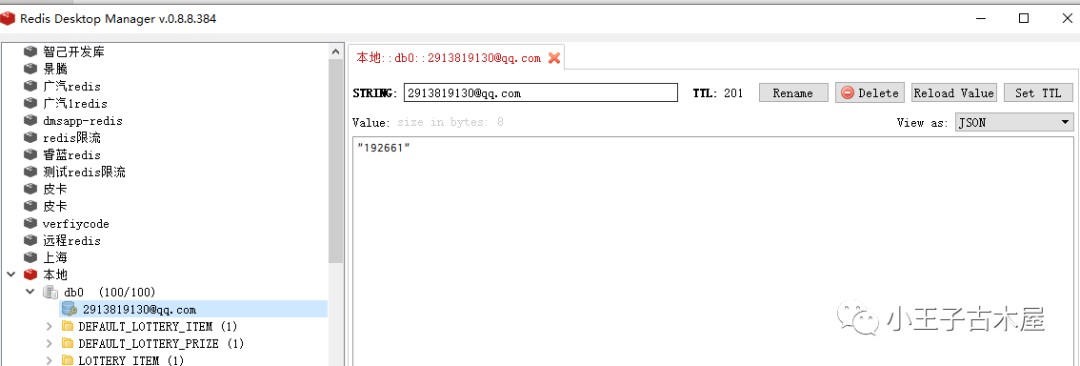
可以看到redis缓存已经有了验证码,300秒后也已成功移除失效了

邮箱里也是能找到对应的验证码,好了,关于这部分的先介绍这里,关于java版本发送邮件可以查看历史文章,链接放下面了。剧透下接下来下一篇文章将会是介绍亚马逊云同款产品s3集成代码使用.
本篇文章来源于微信公众号: 小王子古木屋
微信扫描下方的二维码阅读本文

Comments NOTHING