

如果文章中代码不便于阅读,请使用电脑查看或点击阅读原文。源码详见:
GitHub:https://github.com/dkbnull/SpringBootDemoGitee:https://gitee.com/dkbnull/SpringBootDemo
0 开发环境
-
JDK:1.8
-
Spring Boot:2.7.18
-
Elasticsearch:7.17.18
-
Kibana:7.17.18
-
elasticsearch-head:5.0.0
1 安装服务
1.1 安装Elasticsearch
下载地址:https://www.elastic.co/cn/downloads/past-releases/elasticsearch-7-17-18
下载解压后双击 binelasticsearch.bat 即可运行
注意:解压后路径中不能有空格,示例 D:Programselasticsearch
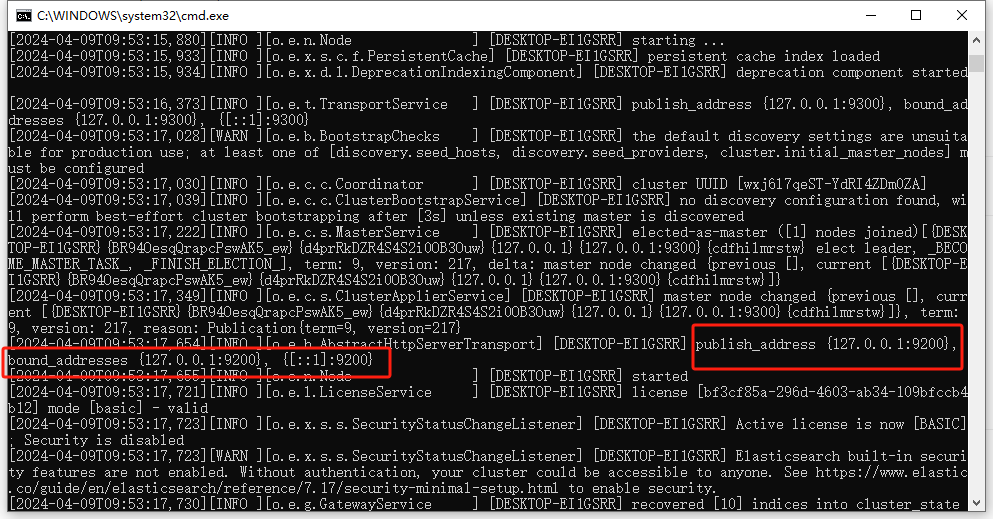
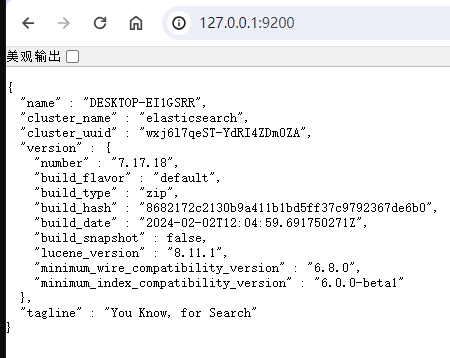
浏览器访问 127.0.0.1:9200
1.2 安装Kibana
本教程中非必须
下载地址:https://www.elastic.co/cn/downloads/past-releases/kibana-7-17-18
一个针对es的开源分析及可视化平台,用于搜索、查看交互存储在es索引中的数据。
下载解压后双击 binkibana.bat 即可运行
注意:要与es版本一致,解压后路径中不能有空格
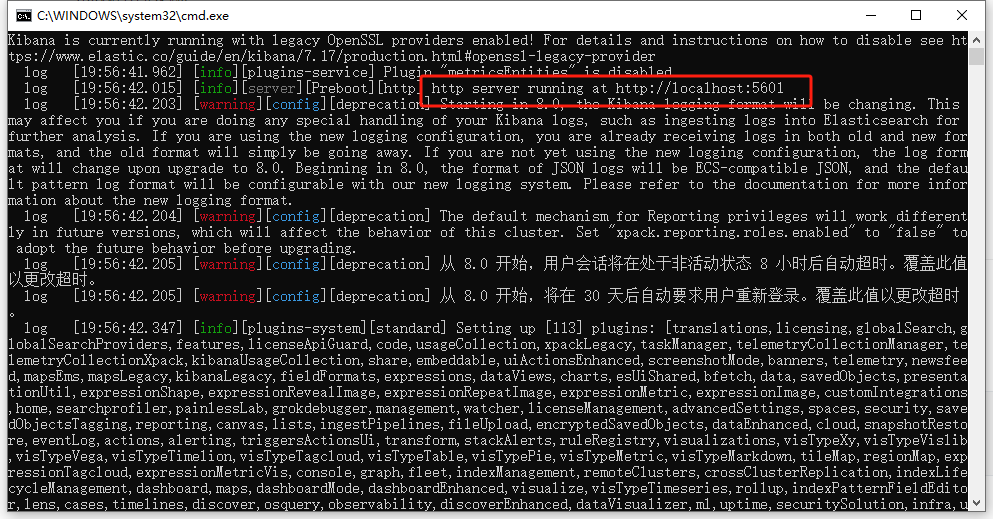
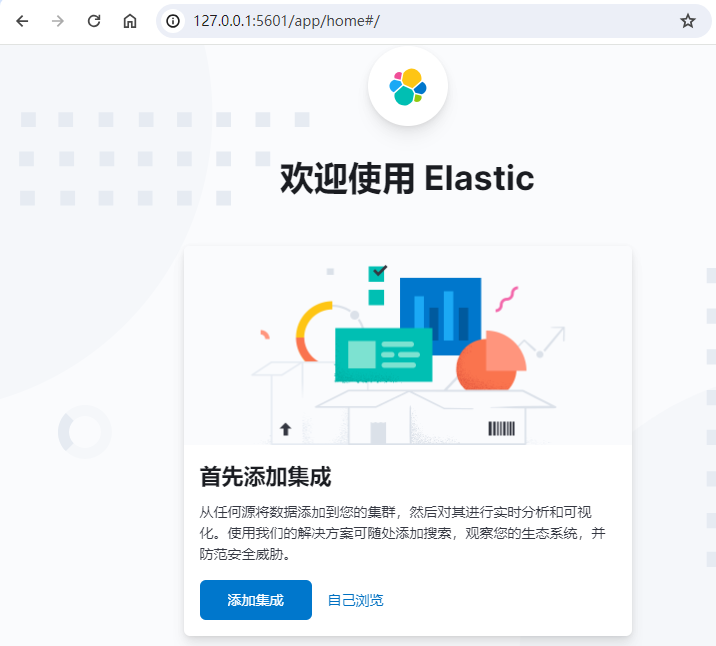
浏览器访问 127.0.0.1:5601
1.3 安装elasticsearch-head
本教程中非必须
下载地址:https://github.com/mobz/elasticsearch-head/releases
启动,命令行执行
npm installnpm run start
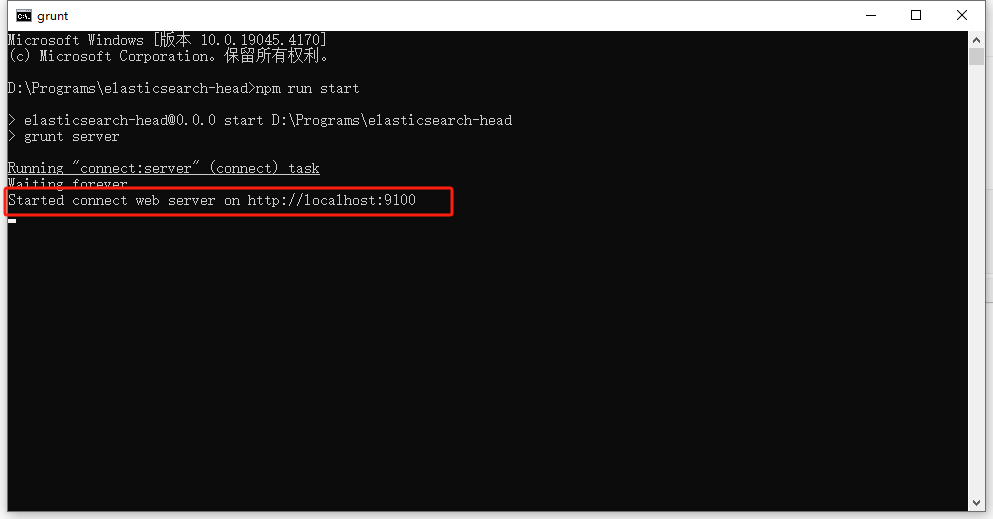
浏览器访问 127.0.0.1:9100
因为存在跨域问题,连接es失败
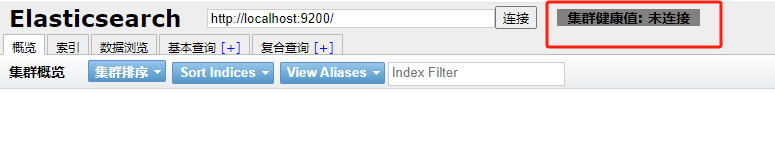
修改elasticsearch配置,elasticsearchconfigelasticsearch.yml,增加支持跨域
http.cors.enabled: truehttp.cors.allow-origin: "*"
重启elasticsearch、elasticsearch-head,刷新页面,连接成功

2 引入依赖
<dependency> <groupId>org.springframework.boot</groupId> <artifactId>spring-boot-starter-data-elasticsearch</artifactId></dependency><!-- https://www.elastic.co/guide/en/elasticsearch/client/java-api-client/7.17/installation.html#class-not-found-jsonprovider --><!-- It may happen that after setting up the dependencies, your application fails with ClassNotFoundException: jakarta.json.spi.JsonProvider. --><!-- If this happens, you have to explicitly add the jakarta.json:jakarta.json-api:2.0.1 dependency. --><dependency> <groupId>jakarta.json</groupId> <artifactId>jakarta.json-api</artifactId> <version>2.0.1</version></dependency><!-- lombok,测试用 --><dependency> <groupId>org.projectlombok</groupId> <artifactId>lombok</artifactId> <version>1.18.30</version> <scope>provided</scope></dependency>
引入成功后,这里注意检查引入的jar包版本号,尽量保证与elasticsearch版本号一致,否则可能会出现莫名奇怪的问题
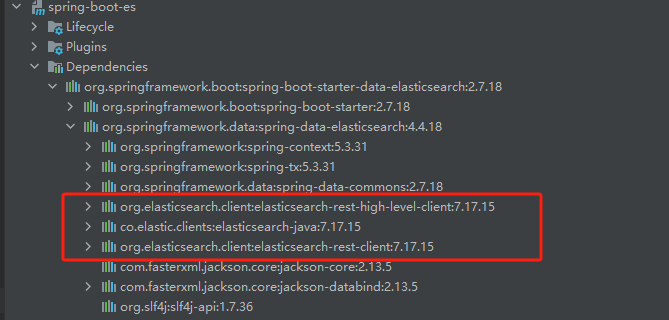
如图所示,程序引入的是7.17.15,但是我们使用的elasticsearch版本是7.17.18,所以这里做下修改
<properties> <maven.compiler.source>8</maven.compiler.source> <maven.compiler.target>8</maven.compiler.target> <project.build.sourceEncoding>UTF-8</project.build.sourceEncoding> <elasticsearch.version>7.17.18</elasticsearch.version></properties>
3 新建配置文件
参考文档:
Java High Level REST Client:https://www.elastic.co/guide/en/elasticsearch/client/java-rest/7.17/java-rest-high.html
Elasticsearch Java API Client:https://www.elastic.co/guide/en/elasticsearch/client/java-api-client/7.17/introduction.html
@Configurationpublic class EsClientConfig { @Bean public ElasticsearchClient elasticsearchClient() { RestClient restClient = RestClient.builder( new HttpHost("localhost", 9200)).build(); ElasticsearchTransport transport = new RestClientTransport( restClient, new JacksonJsonpMapper()); return new ElasticsearchClient(transport); }}
4 测试
4.1 启动elasticsearch
4.2 启动elasticsearch-head
非必须,可视化界面,方便查看
4.3 新建测试类 - 创建索引
@SpringBootTest(classes = ElasticsearchApplication.class, webEnvironment = SpringBootTest.WebEnvironment.DEFINED_PORT)public class ElasticsearchApplicationTest { @Autowired private ElasticsearchClient elasticsearchClient; @Test public void contextLoads() throws IOException { //创建索引 CreateIndexRequest index = new CreateIndexRequest.Builder() .index("test_index") .build(); //执行,获得响应 CreateIndexResponse response = elasticsearchClient.indices().create(index); System.out.println(response.toString()); }}
测试方法成功运行,成功打印创建的索引信息
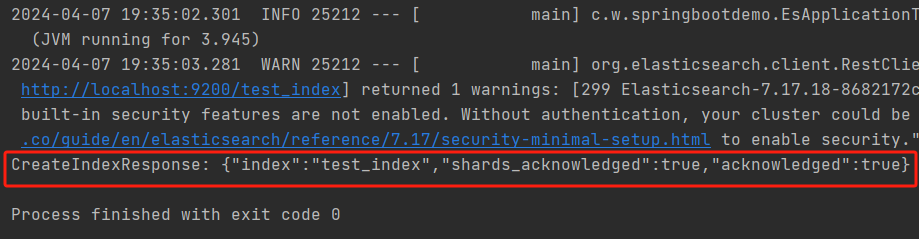
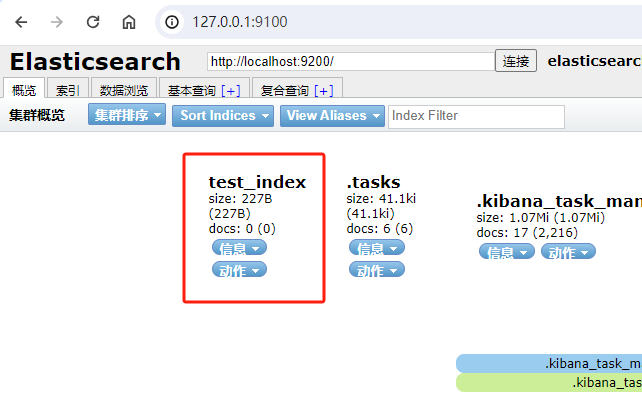
查看elasticsearch-head,索引创建成功
4.4 调整测试类 - 查询索引
我们也可以通过代码获取索引信息
@SpringBootTest(classes = ElasticsearchApplication.class, webEnvironment = SpringBootTest.WebEnvironment.DEFINED_PORT)public class ElasticsearchApplicationTest { @Autowired private ElasticsearchClient elasticsearchClient; //... @Test public void contextLoadsGet() throws IOException { GetIndexRequest index = new GetIndexRequest.Builder() .index("test_index") .build(); GetIndexResponse response = elasticsearchClient.indices().get(index); System.out.println(response.toString()); }}
运行,成功打印查询的索引信息
GetIndexResponse: {"test_index":{"aliases":{},"mappings":{},"settings":{"index":{"number_of_shards":"1","number_of_replicas":"1","routing":{"allocation":{"include":{"_tier_preference":"data_content"}}},"provided_name":"test_index","creation_date":"1712489702602","uuid":"J4kqrjj2TBCHamBa8iMoYA","version":{"created":"7171899"}}}}}
5 新建实体类
@Data@AllArgsConstructor@NoArgsConstructor@Componentpublic class UserModel { private String username; private String password;}
6 测试
6.1 创建文档
@SpringBootTest(classes = ElasticsearchApplication.class, webEnvironment = SpringBootTest.WebEnvironment.DEFINED_PORT)public class ElasticsearchApplicationTest { @Autowired private ElasticsearchClient elasticsearchClient; //... @Test public void contextLoadsAdd() throws IOException { UserModel userModel = new UserModel("张三", "zhangsan"); //创建请求 IndexRequest<UserModel> request = new IndexRequest.Builder<UserModel>() .index("test_index") .id("1") .timeout(new Time.Builder().time("1s").build()) .document(userModel) .build(); //发送请求,获取响应结果 IndexResponse response = elasticsearchClient.index(request); System.out.println(response.toString()); }}
运行,成功创建文档,打印信息如下
IndexResponse: {"_id":"1","_index":"test_index","_primary_term":1,"result":"created","_seq_no":0,"_shards":{"failed":0.0,"successful":1.0,"total":2.0},"_type":"_doc","_version":1}
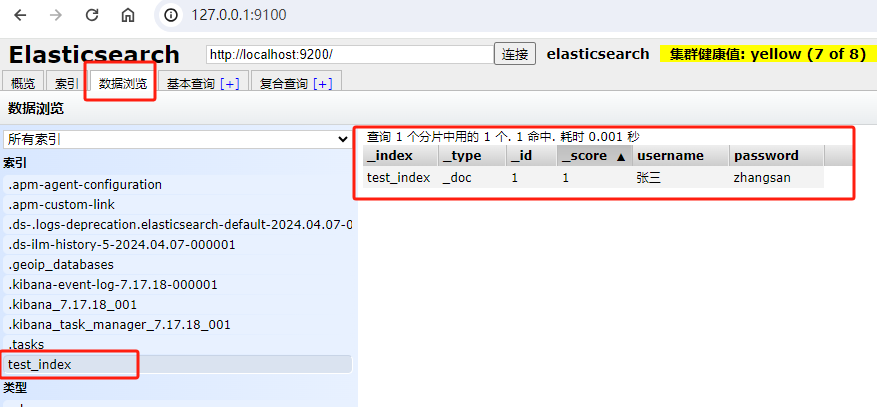
查看elasticsearch-head,文档创建成功,能够成功查询到
6.2 查询文档
@SpringBootTest(classes = ElasticsearchApplication.class, webEnvironment = SpringBootTest.WebEnvironment.DEFINED_PORT)public class ElasticsearchApplicationTest { @Autowired private ElasticsearchClient elasticsearchClient; //... @Test public void contextLoadsGetDoc() throws IOException { //检查文档是否存在 ExistsRequest request = new ExistsRequest.Builder() .index("test_index") .id("1") .build(); BooleanResponse exists = elasticsearchClient.exists(request); System.out.println("BooleanResponse: " + exists.value()); if (!exists.value()) { return; } //若存在,则获取文档信息 GetRequest requestGet = new GetRequest.Builder() .index("test_index") .id("1") .build(); GetResponse<? extends UserModel> responseGet = elasticsearchClient.get(requestGet, UserModel.class); System.out.println(responseGet.toString()); ObjectMapper mapper = new ObjectMapper(); System.out.println(mapper.writeValueAsString(responseGet.source())); }}
运行,成功查询文档信息,打印信息如下
2024-04-07 20:46:55.772 WARN 24760 --- [ main] org.elasticsearch.client.RestClient : request [HEAD http://localhost:9200/test_index/_doc/1] returned 1 warnings: [299 Elasticsearch-7.17.18-8682172c2130b9a411b1bd5ff37c9792367de6b0 "Elasticsearch built-in security features are not enabled. Without authentication, your cluster could be accessible to anyone. See https://www.elastic.co/guide/en/elasticsearch/reference/7.17/security-minimal-setup.html to enable security."]BooleanResponse: true2024-04-07 20:46:55.789 WARN 24760 --- [ main] org.elasticsearch.client.RestClient : request [GET http://localhost:9200/test_index/_doc/1] returned 1 warnings: [299 Elasticsearch-7.17.18-8682172c2130b9a411b1bd5ff37c9792367de6b0 "Elasticsearch built-in security features are not enabled. Without authentication, your cluster could be accessible to anyone. See https://www.elastic.co/guide/en/elasticsearch/reference/7.17/security-minimal-setup.html to enable security."]GetResponse: {"_index":"test_index","found":true,"_id":"1","_primary_term":1,"_seq_no":0,"_source":"UserModel(username=张三, password=zhangsan)","_type":"_doc","_version":1}{"username":"张三","password":"zhangsan"}
6.3 更新文档
@SpringBootTest(classes = ElasticsearchApplication.class, webEnvironment = SpringBootTest.WebEnvironment.DEFINED_PORT)public class ElasticsearchApplicationTest { @Autowired private ElasticsearchClient elasticsearchClient; //... @Test public void contextLoadsUpdate() throws IOException { UserModel userModel = new UserModel("张三三", "zhangsansan"); UpdateRequest<UserModel, UserModel> request = new UpdateRequest.Builder<UserModel, UserModel>() .index("test_index") .id("1") .timeout(new Time.Builder().time("1s").build()) .doc(userModel) .build(); UpdateResponse<UserModel> response = elasticsearchClient.update(request, UserModel.class); System.out.println(response.toString()); }}
测试结果,更新成功
UpdateResponse: {"_id":"1","_index":"test_index","_primary_term":1,"result":"updated","_seq_no":1,"_shards":{"failed":0.0,"successful":1.0,"total":2.0},"_type":"_doc","_version":2}
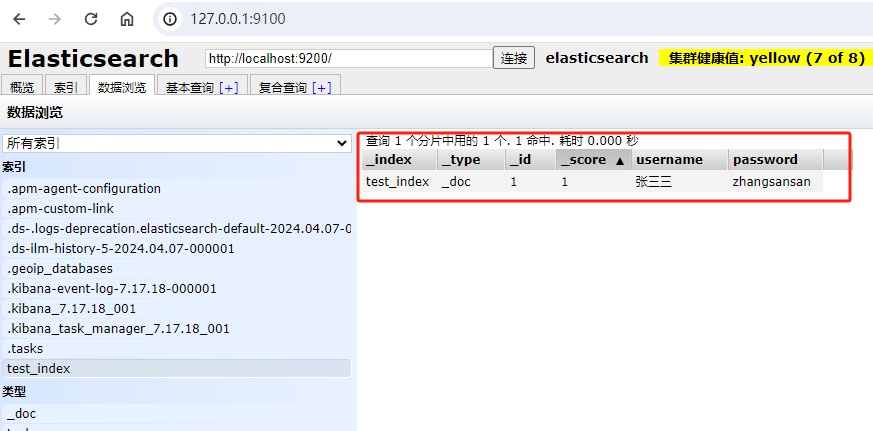
查看elasticsearch-head,更新成功
6.4 删除文档
@SpringBootTest(classes = ElasticsearchApplication.class, webEnvironment = SpringBootTest.WebEnvironment.DEFINED_PORT)public class ElasticsearchApplicationTest { @Autowired private ElasticsearchClient elasticsearchClient; //... @Test public void contextLoadsDelete() throws IOException { DeleteRequest request = new DeleteRequest.Builder() .index("test_index") .id("1") .timeout(new Time.Builder().time("1s").build()) .build(); DeleteResponse response = elasticsearchClient.delete(request); System.out.println(response.toString()); }}
测试结果,删除成功
DeleteResponse: {"_id":"1","_index":"test_index","_primary_term":1,"result":"deleted","_seq_no":2,"_shards":{"failed":0.0,"successful":1.0,"total":2.0},"_type":"_doc","_version":3}
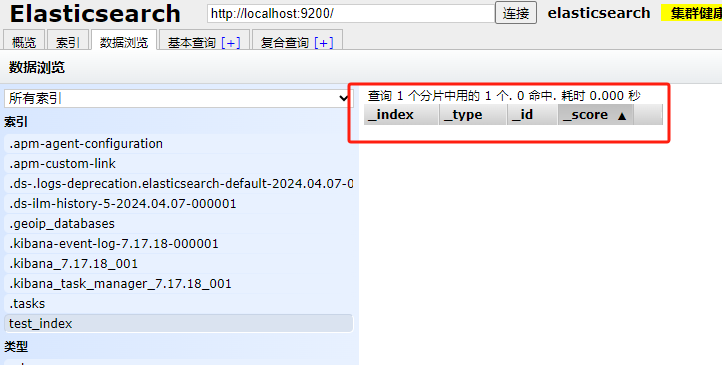
查看elasticsearch-head,删除成功
6.5 批量插入
@SpringBootTest(classes = ElasticsearchApplication.class, webEnvironment = SpringBootTest.WebEnvironment.DEFINED_PORT)public class ElasticsearchApplicationTest { @Autowired private ElasticsearchClient elasticsearchClient; //... @Test public void contextLoadsBulk() throws IOException { List<BulkOperation> operations = new ArrayList<>(); for (int i = 0; i < 100; i++) { UserModel userModel = new UserModel("张三" + i, "zhangsan" + i); operations.add(new BulkOperation(new IndexOperation.Builder<UserModel>() .id(String.valueOf(i + 1)) .document(userModel) .build())); } BulkRequest request = new BulkRequest.Builder() .index("test_index") .timeout(new Time.Builder().time("10s").build()) .operations(operations) .build(); BulkResponse response = elasticsearchClient.bulk(request); System.out.println(response.toString()); }}
测试结果,批量插入成功
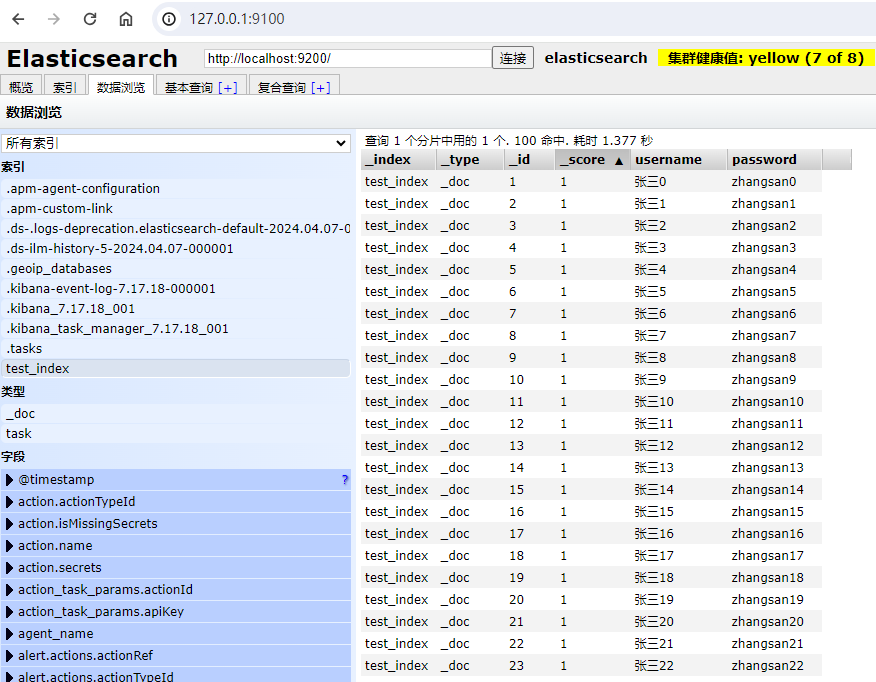
6.6 分词查询
@SpringBootTest(classes = ElasticsearchApplication.class, webEnvironment = SpringBootTest.WebEnvironment.DEFINED_PORT)public class ElasticsearchApplicationTest { @Autowired private ElasticsearchClient elasticsearchClient; //.... @Test public void contextLoadsMatchQuery() throws IOException { //查询条件 MatchQuery matchQuery = new MatchQuery.Builder() .field("username") .query("张三1") .build(); //构建搜索条件 SearchRequest request = new SearchRequest.Builder() .index("test_index") .timeout("10s") .query(new Query.Builder().match(matchQuery).build()) .build(); SearchResponse<UserModel> response = elasticsearchClient.search(request, UserModel.class); System.out.println(response.hits().hits().toString()); }}
测试通过,查询成功
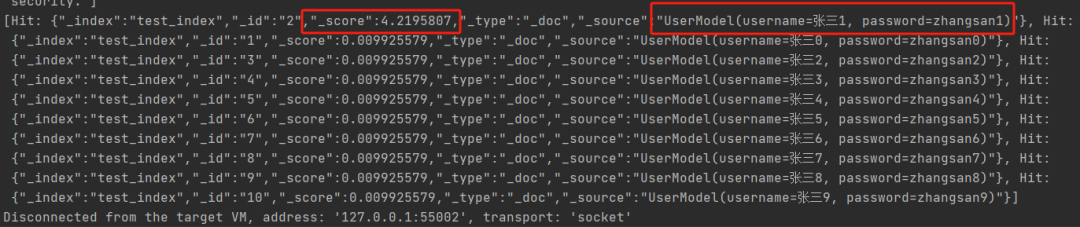
6.7 精确匹配
这里,因为我们没有分词器,所以查询字段需要加上keyword字段
@SpringBootTest(classes = ElasticsearchApplication.class, webEnvironment = SpringBootTest.WebEnvironment.DEFINED_PORT)public class ElasticsearchApplicationTest { @Autowired private ElasticsearchClient elasticsearchClient; //... @Test public void contextLoadsTermQuery() throws IOException { TermQuery termQuery = new TermQuery.Builder() .field("username.keyword") .value("张三1") .build(); SearchRequest request = new SearchRequest.Builder() .index("test_index") .timeout("10s") .query(new Query.Builder().term(termQuery).build()) .build(); SearchResponse<UserModel> response = elasticsearchClient.search(request, UserModel.class); System.out.println(response.hits().hits().toString()); }}
测试通过,查询成功
[Hit: {"_index":"test_index","_id":"2","_score":4.2096553,"_type":"_doc","_source":"UserModel(username=张三1, password=zhangsan1)"}]
6.8 组合查询
@Test public void contextLoadsBoolQuery() throws IOException { TermQuery termQuery1 = new TermQuery.Builder() .field("username.keyword") .value("张三1") .build(); TermQuery termQuery2 = new TermQuery.Builder() .field("password") .value("zhangsan2") .build(); //组合查询 //must AND //mustNot NOT //should OR BoolQuery boolQuery = new BoolQuery.Builder() .should(new Query.Builder().term(termQuery1).build()) .should(new Query.Builder().term(termQuery2).build()) .build(); SearchRequest request = new SearchRequest.Builder() .index("test_index") .timeout("10s") .query(new Query.Builder().bool(boolQuery).build()) .build(); SearchResponse<UserModel> response = elasticsearchClient.search(request, UserModel.class); System.out.println(response.hits().hits().toString()); }
测试通过
[Hit: {"_index":"test_index","_id":"2","_score":4.2096553,"_type":"_doc","_source":"UserModel(username=张三1, password=zhangsan1)"}, Hit: {"_index":"test_index","_id":"3","_score":4.2096553,"_type":"_doc","_source":"UserModel(username=张三2, password=zhangsan2)"}]
6.9 模糊查询
@Test public void contextLoadsFuzzyQuery() throws IOException { FuzzyQuery fuzzyQuery = new FuzzyQuery.Builder() .field("password") .value("zhangsan20") .build(); SearchRequest request = new SearchRequest.Builder() .index("test_index") .timeout("10s") .query(new Query.Builder().fuzzy(fuzzyQuery).build()) .build(); SearchResponse<UserModel> response = elasticsearchClient.search(request, UserModel.class); System.out.println(response.hits().hits().toString()); }
测试通过
[Hit: {"_index":"test_index","_id":"21","_score":4.2096553,"_type":"_doc","_source":"UserModel(username=张三20, password=zhangsan20)"}, Hit: {"_index":"test_index","_id":"11","_score":3.7886896,"_type":"_doc","_source":"UserModel(username=张三10, password=zhangsan10)"}, Hit: {"_index":"test_index","_id":"22","_score":3.7886896,"_type":"_doc","_source":"UserModel(username=张三21, password=zhangsan21)"}, Hit: {"_index":"test_index","_id":"23","_score":3.7886896,"_type":"_doc","_source":"UserModel(username=张三22, password=zhangsan22)"}, Hit: {"_index":"test_index","_id":"24","_score":3.7886896,"_type":"_doc","_source":"UserModel(username=张三23, password=zhangsan23)"}, Hit: {"_index":"test_index","_id":"25","_score":3.7886896,"_type":"_doc","_source":"UserModel(username=张三24, password=zhangsan24)"}, Hit: {"_index":"test_index","_id":"26","_score":3.7886896,"_type":"_doc","_source":"UserModel(username=张三25, password=zhangsan25)"}, Hit: {"_index":"test_index","_id":"27","_score":3.7886896,"_type":"_doc","_source":"UserModel(username=张三26, password=zhangsan26)"}, Hit: {"_index":"test_index","_id":"28","_score":3.7886896,"_type":"_doc","_source":"UserModel(username=张三27, password=zhangsan27)"}, Hit: {"_index":"test_index","_id":"29","_score":3.7886896,"_type":"_doc","_source":"UserModel(username=张三28, password=zhangsan28)"}]
6.10 根据ID查询
@Test public void contextLoadsIdsQuery() throws IOException { IdsQuery idsQuery = new IdsQuery.Builder() .values("1", "2", "3") .build(); SearchRequest request = new SearchRequest.Builder() .index("test_index") .timeout("10s") .query(new Query.Builder().ids(idsQuery).build()) .build(); SearchResponse<UserModel> response = elasticsearchClient.search(request, UserModel.class); System.out.println(response.hits().hits().toString()); }
测试通过
[Hit: {"_index":"test_index","_id":"1","_score":1.0,"_type":"_doc","_source":"UserModel(username=张三0, password=zhangsan0)"}, Hit: {"_index":"test_index","_id":"2","_score":1.0,"_type":"_doc","_source":"UserModel(username=张三1, password=zhangsan1)"}, Hit: {"_index":"test_index","_id":"3","_score":1.0,"_type":"_doc","_source":"UserModel(username=张三2, password=zhangsan2)"}]
6.11 范围查询
@Test public void contextLoadsRangeQuery() throws IOException { RangeQuery rangeQuery = new RangeQuery.Builder() .field("password") .gte(JsonData.of("zhangsan10")) .lte(JsonData.of("zhangsan15")) .build(); SearchRequest request = new SearchRequest.Builder() .index("test_index") .timeout("10s") .query(new Query.Builder().range(rangeQuery).build()) .build(); SearchResponse<UserModel> response = elasticsearchClient.search(request, UserModel.class); System.out.println(response.hits().hits().toString()); }
测试通过
[Hit: {"_index":"test_index","_id":"11","_score":1.0,"_type":"_doc","_source":"UserModel(username=张三10, password=zhangsan10)"}, Hit: {"_index":"test_index","_id":"12","_score":1.0,"_type":"_doc","_source":"UserModel(username=张三11, password=zhangsan11)"}, Hit: {"_index":"test_index","_id":"13","_score":1.0,"_type":"_doc","_source":"UserModel(username=张三12, password=zhangsan12)"}, Hit: {"_index":"test_index","_id":"14","_score":1.0,"_type":"_doc","_source":"UserModel(username=张三13, password=zhangsan13)"}, Hit: {"_index":"test_index","_id":"15","_score":1.0,"_type":"_doc","_source":"UserModel(username=张三14, password=zhangsan14)"}, Hit: {"_index":"test_index","_id":"16","_score":1.0,"_type":"_doc","_source":"UserModel(username=张三15, password=zhangsan15)"}]
6.12 通配符查询
@Test public void contextLoadsWildcardQuery() throws IOException { WildcardQuery wildcardQuery = new WildcardQuery.Builder() .field("password") .value("zhang*9") .build(); SearchRequest request = new SearchRequest.Builder() .index("test_index") .timeout("10s") .query(new Query.Builder().wildcard(wildcardQuery).build()) .build(); SearchResponse<UserModel> response = elasticsearchClient.search(request, UserModel.class); System.out.println(response.hits().hits().toString()); }
测试通过
[Hit: {"_index":"test_index","_id":"10","_score":1.0,"_type":"_doc","_source":"UserModel(username=张三9, password=zhangsan9)"}, Hit: {"_index":"test_index","_id":"20","_score":1.0,"_type":"_doc","_source":"UserModel(username=张三19, password=zhangsan19)"}, Hit: {"_index":"test_index","_id":"30","_score":1.0,"_type":"_doc","_source":"UserModel(username=张三29, password=zhangsan29)"}, Hit: {"_index":"test_index","_id":"40","_score":1.0,"_type":"_doc","_source":"UserModel(username=张三39, password=zhangsan39)"}, Hit: {"_index":"test_index","_id":"50","_score":1.0,"_type":"_doc","_source":"UserModel(username=张三49, password=zhangsan49)"}, Hit: {"_index":"test_index","_id":"60","_score":1.0,"_type":"_doc","_source":"UserModel(username=张三59, password=zhangsan59)"}, Hit: {"_index":"test_index","_id":"70","_score":1.0,"_type":"_doc","_source":"UserModel(username=张三69, password=zhangsan69)"}, Hit: {"_index":"test_index","_id":"80","_score":1.0,"_type":"_doc","_source":"UserModel(username=张三79, password=zhangsan79)"}, Hit: {"_index":"test_index","_id":"90","_score":1.0,"_type":"_doc","_source":"UserModel(username=张三89, password=zhangsan89)"}, Hit: {"_index":"test_index","_id":"100","_score":1.0,"_type":"_doc","_source":"UserModel(username=张三99, password=zhangsan99)"}]
6.13 前缀匹配查询
@Test public void contextLoadsPrefixQuery() throws IOException { PrefixQuery prefixQuery = new PrefixQuery.Builder() .field("password") .value("zhangsan9") .build(); SearchRequest request = new SearchRequest.Builder() .index("test_index") .timeout("10s") .query(new Query.Builder().prefix(prefixQuery).build()) .build(); SearchResponse<UserModel> response = elasticsearchClient.search(request, UserModel.class); System.out.println(response.hits().hits().toString()); }
测试通过
[Hit: {"_index":"test_index","_id":"10","_score":1.0,"_type":"_doc","_source":"UserModel(username=张三9, password=zhangsan9)"}, Hit: {"_index":"test_index","_id":"91","_score":1.0,"_type":"_doc","_source":"UserModel(username=张三90, password=zhangsan90)"}, Hit: {"_index":"test_index","_id":"92","_score":1.0,"_type":"_doc","_source":"UserModel(username=张三91, password=zhangsan91)"}, Hit: {"_index":"test_index","_id":"93","_score":1.0,"_type":"_doc","_source":"UserModel(username=张三92, password=zhangsan92)"}, Hit: {"_index":"test_index","_id":"94","_score":1.0,"_type":"_doc","_source":"UserModel(username=张三93, password=zhangsan93)"}, Hit: {"_index":"test_index","_id":"95","_score":1.0,"_type":"_doc","_source":"UserModel(username=张三94, password=zhangsan94)"}, Hit: {"_index":"test_index","_id":"96","_score":1.0,"_type":"_doc","_source":"UserModel(username=张三95, password=zhangsan95)"}, Hit: {"_index":"test_index","_id":"97","_score":1.0,"_type":"_doc","_source":"UserModel(username=张三96, password=zhangsan96)"}, Hit: {"_index":"test_index","_id":"98","_score":1.0,"_type":"_doc","_source":"UserModel(username=张三97, password=zhangsan97)"}, Hit: {"_index":"test_index","_id":"99","_score":1.0,"_type":"_doc","_source":"UserModel(username=张三98, password=zhangsan98)"}]
其他用法类似,这里不再测试了。
至此,SpringBoot成功整合es且测试通过。
CSDN:https://blog.csdn.net/dkbnull/article/details/137748709
本篇文章来源于微信公众号: 程序员null
微信扫描下方的二维码阅读本文

Comments NOTHING