

如果文章中代码不便于阅读,请使用电脑查看或点击阅读原文。源码详见:
GitHub:https://github.com/dkbnull/SpringBootDemoGitee:https://gitee.com/dkbnull/SpringBootDemo
通过Spring Boot整合邮件任务,支持发送邮件,可以实现服务故障时向指定邮箱发送邮件。
0 开发环境
-
JDK:1.8
-
Spring Boot:2.7.18
1 引入依赖
<dependency> <groupId>org.springframework.boot</groupId> <artifactId>spring-boot-starter-mail</artifactId></dependency>
2 配置邮箱地址
2.1 获取授权码
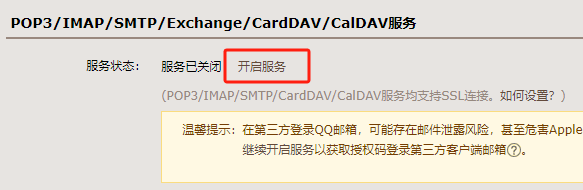
以QQ邮箱为例,点击【设置】,进入设置页面,点击【账号】标签,开启【POP3/IMAP/SMTP/Exchange/CardDAV/CalDAV服务】
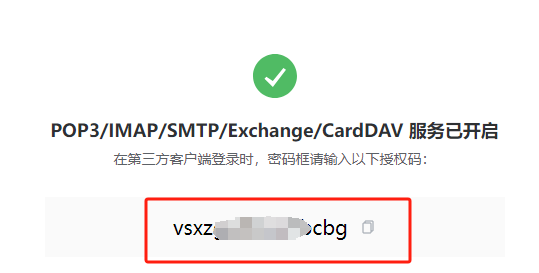
开启服务后可以得到一个授权码
2.2 配置邮箱地址
server: port: 8090spring: mail: #邮箱地址 username: 921xxxxxx@qq.com #授权码 password: vsxzxxxxxxxxxcbg #发送服务器 host: smtp.qq.com #开启加密授权验证 properties: mail: smtp: ssl: enable: true
这里,QQ邮箱需要开启加密授权验证,网易邮箱不需要
3 测试
新建测试类
@SpringBootTest(classes = MailApplication.class, webEnvironment = SpringBootTest.WebEnvironment.DEFINED_PORT)public class MailApplicationTest { @Autowired private JavaMailSenderImpl mailSender; @Test public void contextLoads() { SimpleMailMessage simpleMailMessage = new SimpleMailMessage(); //邮件主题 simpleMailMessage.setSubject("服务故障报警"); //邮件正文 simpleMailMessage.setText("xxx服务故障!请及时处理!"); simpleMailMessage.setTo("921xxxxxx@qq.com"); simpleMailMessage.setFrom("921xxxxxx@qq.com"); mailSender.send(simpleMailMessage); }}
这里@Autowired可能会有报错,不用管,只能使用自动装配方式获取JavaMailSenderImpl对象,如果自己new的话,会丢失配置信息。
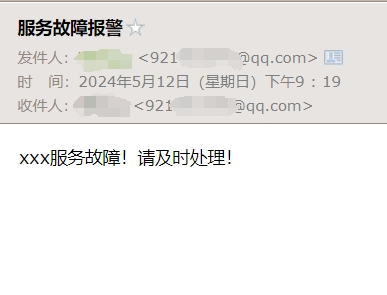
运行测试类,成功收到邮件,发件人和收件人都是配置的邮箱地址
4 发送复杂邮件
4.1 新建附件文件

4.2 调整测试类
@SpringBootTest(classes = MailApplication.class, webEnvironment = SpringBootTest.WebEnvironment.DEFINED_PORT)public class MailApplicationTest { @Autowired private JavaMailSenderImpl mailSender; //contextLoads() @Test public void contextLoadsMime() throws MessagingException, UnsupportedEncodingException { //复杂邮件 MimeMessage mimeMessage = mailSender.createMimeMessage(); //组装,支持多文件 MimeMessageHelper mimeMessageHelper = new MimeMessageHelper(mimeMessage, true); mimeMessageHelper.setSubject("复杂服务故障报警"); //邮件正文,支持html标签 mimeMessageHelper.setText("<p style='color: red'>xxx服务故障!请及时处理!</p>", true); //附件 //MimeUtility.encodeWord()防止中文乱码 mimeMessageHelper.addAttachment(MimeUtility.encodeWord("故障附件.txt", "UTF-8", "B"), new File("data/故障附件.txt")); mimeMessageHelper.addAttachment("error.txt", new File("data/error.txt")); mimeMessageHelper.setTo("921xxxxxx@qq.com"); mimeMessageHelper.setFrom("921xxxxxx@qq.com"); mailSender.send(mimeMessage); }}
运行测试类,成功收到邮件,正文及附件显示正常
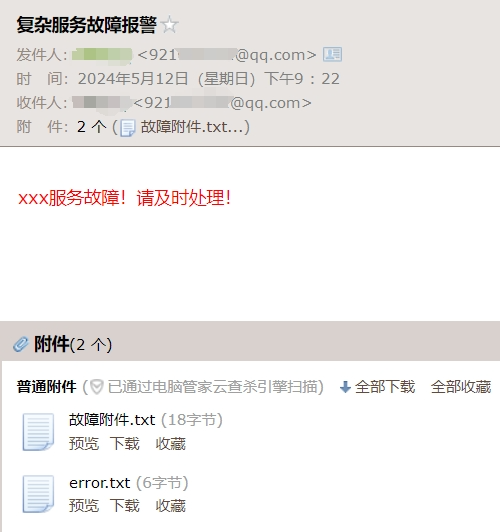
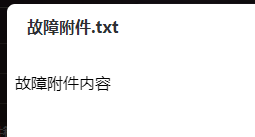
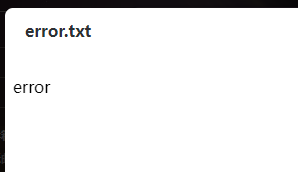
附件内容正常
至此,Spring Boot成功支持发送邮件。
CSDN:https://blog.csdn.net/dkbnull/article/details/138768207
本篇文章来源于微信公众号: 程序员null
微信扫描下方的二维码阅读本文

Comments NOTHING