

项目地址
https://github.com/AYYQ127/k8s_kubeadm_install
系统环境
ubuntu22.04
-
为什么采用openresty,因为它支持原生支持lua脚本,可以有很多扩展性 由于openresty的安装区别于ubuntu22.04版本以前和以后,此处只添加了22.04安装方式,20.04暂未适配其他版本可以自行修改 https://openresty.org/cn/linux-packages.html#ubuntu
-
命令执行 执行playbook为main-ubuntu2204-ha.yaml,其余步骤完全一样
root@master1:/home/ubuntu/k8s_kubeadm_install/files# kubectl get pod ha-deployment-64d67b6ddc-57wzz -o yaml | grep tolerations: -A 8 tolerations: - effect: NoExecute key: node.kubernetes.io/not-ready operator: Exists tolerationSeconds: 300 - effect: NoExecute key: node.kubernetes.io/unreachable operator: Exists tolerationSeconds: 300 # 修改前,默认的时间为5分钟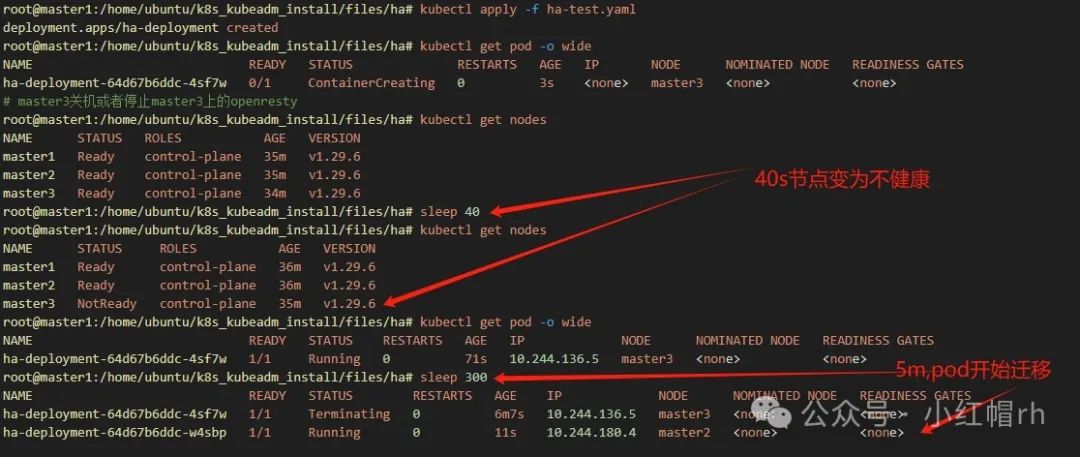
#改完后root@master1:/home/ubuntu/k8s_kubeadm_install/files/ha/# ansible-playbook change_noexecute_time.yamlPLAY [修改集群默认驱逐时间(所有节点)] ******************************************************************************TASK [1:检查change_noexecute_time.lock文件是否存在] *************************************************************************************************************ok: [master1]ok: [master3]ok: [master2]TASK [将一个 Node 标记为不健康之前允许其无响应的时长上限] ***************************************************************************************************************changed: [master2]changed: [master1]changed: [master3]TASK [对污点 Unreachable:NoExecute 的容忍时长] ****************************************************************************************************************changed: [master2]changed: [master1]changed: [master3]TASK [3.12:创建安装lock文件] **************************************************************************************changed: [master1]changed: [master2]changed: [master3]PLAY RECAP *******************************************************************************************************master1 : ok=4 changed=3 unreachable=0 failed=0 skipped=0 rescued=0 ignored=0master2 : ok=4 changed=3 unreachable=0 failed=0 skipped=0 rescued=0 ignored=0master3 : ok=4 changed=3 unreachable=0 failed=0 skipped=0 rescued=0 ignored=0root@master1:/home/ubuntu/k8s_kubeadm_install# kubectl delete -f files/ha/ha-test.yamldeployment.apps "ha-deployment" deletedroot@master1:/home/ubuntu/k8s_kubeadm_install# kubectl apply -f files/ha/ha-test.yamldeployment.apps/ha-deployment createdroot@master1:/home/ubuntu/k8s_kubeadm_install# kubectl get pod ha-deployment-64d67b6ddc-hkbqp -o yaml | grep tolerations: -A 8 tolerations: - effect: NoExecute key: node.kubernetes.io/not-ready operator: Exists tolerationSeconds: 300 - effect: NoExecute key: node.kubernetes.io/unreachable operator: Exists tolerationSeconds: 60 # 重新生成的pod,此处已经变为60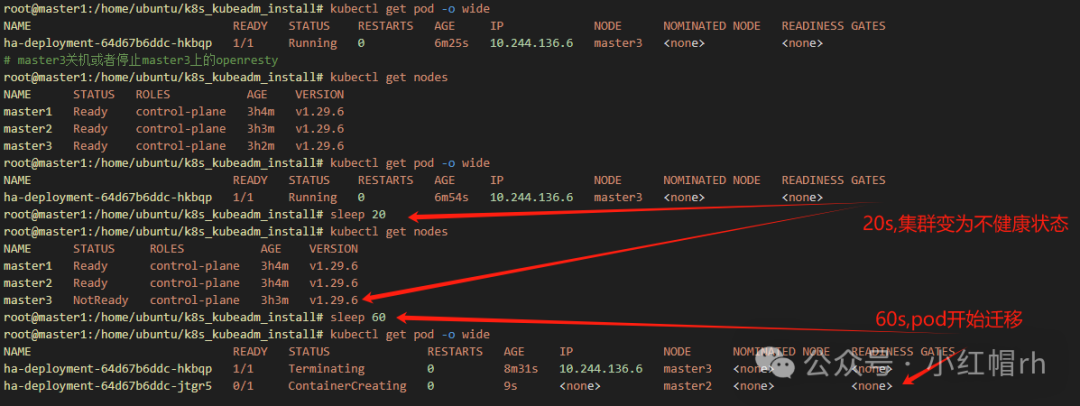
本篇文章来源于微信公众号: 小红帽rh
微信扫描下方的二维码阅读本文

Comments NOTHING