

如果教程中代码不便于阅读,请使用电脑查看或点击阅读原文。
-
IDE:IntelliJ IDEA 2017.1 x64
-
jdk:1.8.0_91
-
Spring Boot:2.1.1.RELEASE
-
Maven:3.3.9
<dependency> <groupId>org.mybatis.spring.boot</groupId> <artifactId>mybatis-spring-boot-starter</artifactId> <version>1.3.2</version> </dependency> <dependency> <groupId>mysql</groupId> <artifactId>mysql-connector-java</artifactId> <version>8.0.15</version> <scope>runtime</scope> </dependency>
这里,如果使用的 MySQL 是 8.X版本的话,mysql-connector-java 版本必须是 8.0以上,否则会报错:
java.sql.SQLException: Unable to load authentication plugin 'caching_sha2_password'
2. 引入数据源
application.yml 增加如下配置信息
spring: datasource: url: jdbc:mysql://127.0.0.1:3306/test?serverTimezone=GMT%2B8 username: root password: root driver-class-name: com.mysql.cj.jdbc.Driver
这里,如果使用的 mysql-connector-java 是5.X版本的话,driver-class-name 可以直接省略使用默认,或者配置为 com.mysql.jdbc.Driver
到这里,Spring Boot就可以访问数据库了,我们来做下测试。
3. 测试
3.1 新建数据库表
CREATE SCHEMA `test` ; CREATE TABLE `test`.`test` ( `id` INT NOT NULL AUTO_INCREMENT, `name` VARCHAR(45) NOT NULL, PRIMARY KEY (`id`)); INSERT INTO `test`.`test` (`name`) VALUES ('张三'); INSERT INTO `test`.`test` (`name`) VALUES ('李四'); INSERT INTO `test`.`test` (`name`) VALUES ('王五'); INSERT INTO `test`.`test` (`name`) VALUES ('周六');
3.2 创建实体
package cn.wbnull.springbootdemo.model; public class TestModel { private int id; private String name; public int getId() { return id; } public void setId(int id) { this.id = id; } public String getName() { return name; } public void setName(String name) { this.name = name; } }
3.3 DAO层
package cn.wbnull.springbootdemo.dao; import cn.wbnull.springbootdemo.model.TestModel; import org.apache.ibatis.annotations.Insert; import org.apache.ibatis.annotations.Mapper; import org.apache.ibatis.annotations.Param; import org.apache.ibatis.annotations.Select; import java.util.List; public interface TestMapper { ("select id,name from test") List<TestModel> select(); ("insert into test(name) values(#{name})") int insert(("name") String name); }
3.4 Service层
package cn.wbnull.springbootdemo.service; import cn.wbnull.springbootdemo.dao.TestMapper; import cn.wbnull.springbootdemo.model.TestModel; import org.springframework.beans.factory.annotation.Autowired; import org.springframework.stereotype.Service; import java.util.List; public class MySQLTestService { private TestMapper testMapper; //这里会有报错,不用管 public List<TestModel> select() { return testMapper.select(); } public int insert(String name) { return testMapper.insert(name); } }
3.5 Controller层
package cn.wbnull.springbootdemo.controller; import cn.wbnull.springbootdemo.model.TestModel; import cn.wbnull.springbootdemo.service.MySQLTestService; import org.springframework.beans.factory.annotation.Autowired; import org.springframework.context.annotation.Scope; import org.springframework.web.bind.annotation.PostMapping; import org.springframework.web.bind.annotation.RequestMapping; import org.springframework.web.bind.annotation.RequestParam; import org.springframework.web.bind.annotation.RestController; import java.util.List; ("prototype") ("/mysql/test") public class MySQLTestController { private MySQLTestService mySQLTestService; (value = "/select") public List<TestModel> select() throws Exception { return mySQLTestService.select(); } (value = "/insert") public int insert((value = "name") String name) throws Exception { return mySQLTestService.insert(name); } }
3.6 测试
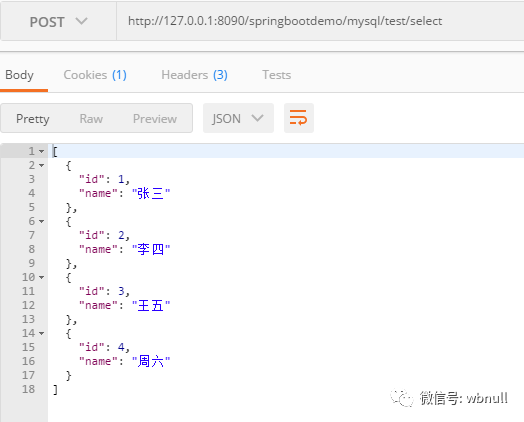
使用Postman进行测试,输出结果如下
3.6.1 select
3.6.2 insert
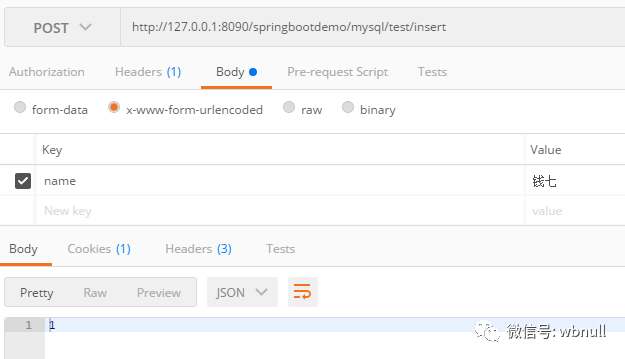
Postman接收到输出为1,表示成功,我们去查下数据库
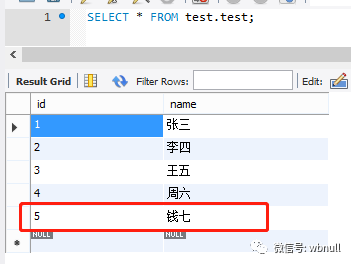
数据成功插入。
4. MyBatis映射文件
以上,我们访问数据库时,SQL语句还是写死在代码里面,处理起来并没有很方便。通常,我们把SQL语句与代码分离,使用MyBatis映射文件方式来访问数据库。
4.1 MyBatis配置
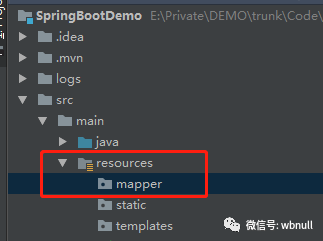
我们在resources文件夹下新建mapper文件夹,用于存放MyBatis映射文件
application.yml 增加MyBatis配置信息
mybatis: mapper-locations: classpath:mapper/*.xml #对应mapper映射xml文件所在路径 type-aliases-package: cn.wbnull.springbootdemo.model #对应实体类路径
完整配置如下,注意spring与mybatis都是根节点
spring: datasource: url: jdbc:mysql://127.0.0.1:3306/test?serverTimezone=GMT%2B8 username: root password: root driver-class-name: com.mysql.cj.jdbc.Driver # mybatis: mapper-locations: classpath:mapper/*.xml #对应mapper映射xml文件所在路径 type-aliases-package: cn.wbnull.springbootdemo.model #对应实体类路径
4.2 DAO层
我们创建一个新的DAO类
package cn.wbnull.springbootdemo.dao; import cn.wbnull.springbootdemo.model.TestModel; import java.util.List; public interface TestMapperV2 { List<TestModel> select(); int insert(TestModel testModel); }
4.3 创建MyBatis映射文件
resources/mapper下新建映射文件 TestMapper.xml
<mapper namespace="cn.wbnull.springbootdemo.dao.TestMapperV2"> <resultMap id="BaseResultMap" type="cn.wbnull.springbootdemo.model.TestModel"> <id column="id" property="id" jdbcType="INTEGER"/> <result column="name" property="name" jdbcType="VARCHAR"/> </resultMap> <sql id="Base_Column_List"> id, name </sql> <select id="select" resultMap="BaseResultMap"> select <include refid="Base_Column_List"/> from test </select> <insert id="insert" parameterType="cn.wbnull.springbootdemo.model.TestModel"> insert into test (id, name ) values (#{id,jdbcType=INTEGER}, #{name,jdbcType=VARCHAR} ) </insert> </mapper>
这里着重注意这几点
1、<mapper namespace="cn.wbnull.springbootdemo.dao.TestMapperV2"> namespace 一定要对应自己dao包所在的包路径,对应我们需要匹配的dao层类
2、<resultMap id="BaseResultMap" type="cn.wbnull.springbootdemo.model.TestModel"> type 一定要对应我们需要匹配的实体类
3、 <id column="id" property="id" jdbcType="INTEGER"/>
<result column="name" property="name" jdbcType="VARCHAR"/>
对应数据库表的字段
4、<select id="select" resultMap="BaseResultMap">
select <include refid="Base_Column_List"/> from test
</select>
<select> 表示这是一条查询语句, id="select"一定要与dao层需要匹配的方法名一致,resultMap 表示对应的返回值类型
5、<insert id="insert" parameterType="cn.wbnull.springbootdemo.model.TestModel"> parameterType表示对应的输入参数类型
4.4 Service层
创建一个新的Service类
package cn.wbnull.springbootdemo.service; import cn.wbnull.springbootdemo.dao.TestMapperV2; import cn.wbnull.springbootdemo.model.TestModel; import org.springframework.beans.factory.annotation.Autowired; import org.springframework.stereotype.Service; import java.util.List; public class MySQLTestServiceV2 { private TestMapperV2 testMapperV2; //这里会有报错,不用管 public List<TestModel> select() { return testMapperV2.select(); } public int insert(int id, String name) { TestModel testModel = new TestModel(); testModel.setId(id); testModel.setName(name); return testMapperV2.insert(testModel); } }
4.5 Controller层
创建一个新的Controller类
package cn.wbnull.springbootdemo.controller; import cn.wbnull.springbootdemo.model.TestModel; import cn.wbnull.springbootdemo.service.MySQLTestServiceV2; import org.springframework.beans.factory.annotation.Autowired; import org.springframework.context.annotation.Scope; import org.springframework.web.bind.annotation.PostMapping; import org.springframework.web.bind.annotation.RequestMapping; import org.springframework.web.bind.annotation.RequestParam; import org.springframework.web.bind.annotation.RestController; import java.util.List; ("prototype") ("/mysql/test") public class MySQLTestControllerV2 { private MySQLTestServiceV2 mySQLTestServiceV2; (value = "/selectV2") public List<TestModel> select() throws Exception { return mySQLTestServiceV2.select(); } (value = "/insertV2") public int insert((value = "id") int id, (value = "name") String name) throws Exception { return mySQLTestServiceV2.insert(id, name); } }
4.6 项目启动类
增加@MapperScan("cn.wbnull.springbootdemo.dao"),对应DAO层的包名
package cn.wbnull.springbootdemo; import org.mybatis.spring.annotation.MapperScan; import org.springframework.boot.SpringApplication; import org.springframework.boot.autoconfigure.SpringBootApplication; ("cn.wbnull.springbootdemo.dao") public class SpringBootDemoApplication { public static void main(String[] args) { SpringApplication.run(SpringBootDemoApplication.class, args); } }
4.7 测试
4.7.1 select
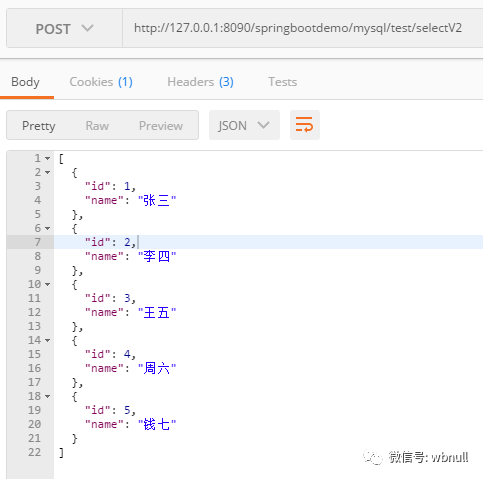
4.7.2 insert
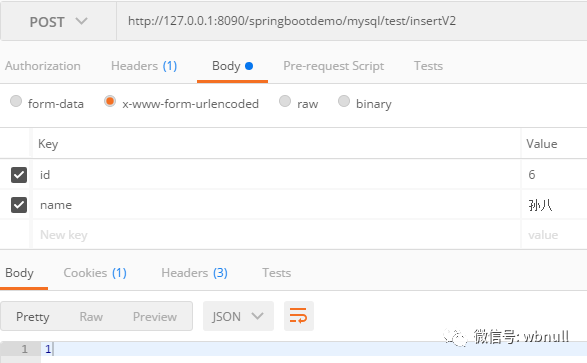
Postman接收到输出为1,表示成功,我们去查下数据库
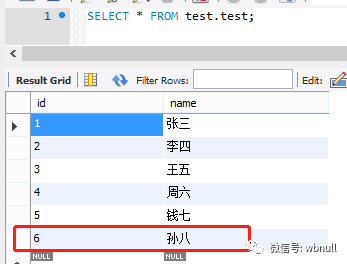
数据成功插入
截至这里,Spring Boot已成功整合MyBatis并连接上了数据库,且测试正常。
但我们实际开发过程中,如果存在大量数据库表,那我们就需要创建大量的实体类、DAO层、映射文件,工作量较大。我们使用mybatis generator来自动生成代码。
5. Generator
5.1 新建数据库表
我们先新建一个数据库表,便于一会自动生成代码使用
CREATE TABLE `test`.`testv2` ( `id` INT NOT NULL AUTO_INCREMENT, `username` VARCHAR(45) NOT NULL, `password` VARCHAR(45) NOT NULL, PRIMARY KEY (`id`));
5.2 Generator配置文件
在resources文件夹下新建generator文件夹,generator下新建generatorConfig.xml
<generatorConfiguration> <!--数据库驱动,选择本地硬盘上的数据库驱动包,建议与pom.xml引入的jar包版本相同--> <classPathEntry location="D:Program FilesMavenrepositorymysqlmysql-connector-java8.0.15mysql-connector-java-8.0.15.jar"/> <context id="DB2Tables" targetRuntime="MyBatis3"> <commentGenerator> <property name="suppressDate" value="true"/> <!--是否去除自动生成的注释,true:是 false:否--> <property name="suppressAllComments" value="true"/> </commentGenerator> <!--数据库驱动类、链接url、用户名、密码,与application.yml配置相同即可--> <jdbcConnection driverClass="com.mysql.cj.jdbc.Driver" connectionURL="jdbc:mysql://127.0.0.1:3306/test?serverTimezone=GMT%2B8" userId="root" password="root"> </jdbcConnection> <javaTypeResolver> <property name="forceBigDecimals" value="false"/> </javaTypeResolver> <!--生成实体类的包名和位置--> <javaModelGenerator targetPackage="cn.wbnull.springbootdemo.model" targetProject="src/main/java"> <property name="enableSubPackages" value="true"/> <property name="trimStrings" value="true"/> </javaModelGenerator> <!--生成映射文件的包名和位置--> <sqlMapGenerator targetPackage="mapper" targetProject="src/main/resources"> <property name="enableSubPackages" value="true"/> </sqlMapGenerator> <!--生成DAO的包名和位置--> <javaClientGenerator type="XMLMAPPER" targetPackage="cn.wbnull.springbootdemo.dao" targetProject="src/main/java"> <property name="enableSubPackages" value="true"/> </javaClientGenerator> <!--需要自动生成代码的数据库表 tableName表示数据库中的表名或视图名 domainObjectName表示实体类名--> <table tableName="testv2" domainObjectName="TestV2" enableCountByExample="false" enableUpdateByExample="false" enableDeleteByExample="false" enableSelectByExample="false" selectByExampleQueryId="false"/> </context> </generatorConfiguration>
5.3 引入依赖
<plugin> <groupId>org.mybatis.generator</groupId> <artifactId>mybatis-generator-maven-plugin</artifactId> <version>1.3.2</version> <configuration> <configurationFile>${basedir}/src/main/resources/generator/generatorConfig.xml</configurationFile> <overwrite>true</overwrite> <verbose>true</verbose> </configuration> </plugin>
5.4 Generator配置
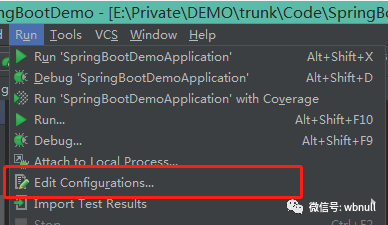
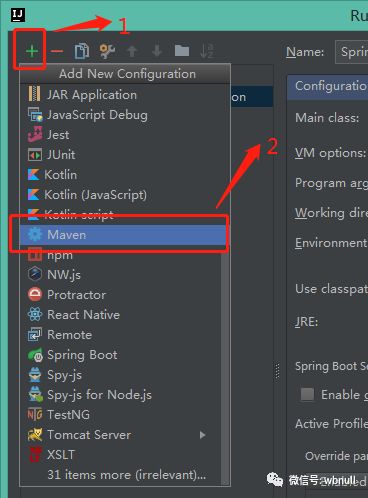
1、Run --> Edit Configurations...
2、增加Maven配置
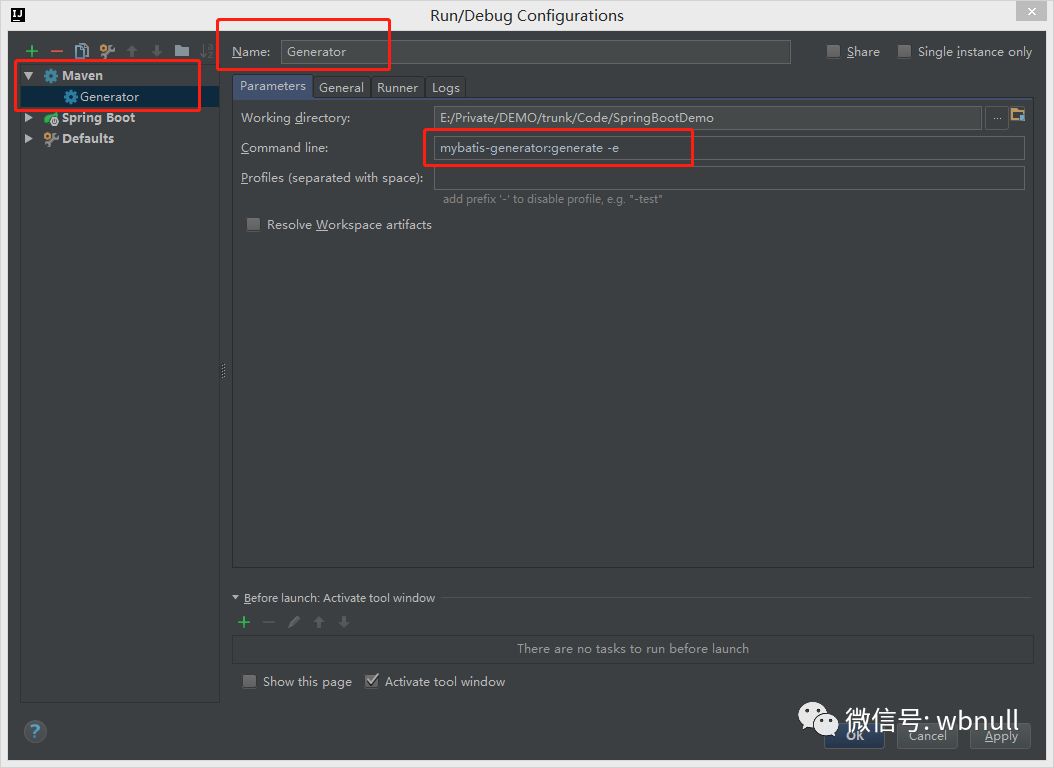
3、增加Generator配置 (mybatis-generator:generate -e),OK
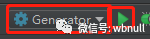
4、运行
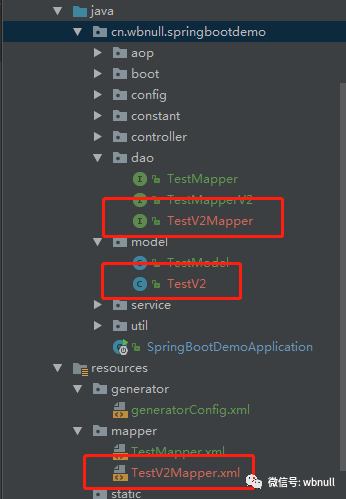
生成代码如下。这里我们运行成功后,同一个表,不要运行多次,否则mapper映射文件中会生成多次的代码。
package cn.wbnull.springbootdemo.model; public class TestV2 { private Integer id; private String username; private String password; public Integer getId() { return id; } public void setId(Integer id) { this.id = id; } public String getUsername() { return username; } public void setUsername(String username) { this.username = username == null ? null : username.trim(); } public String getPassword() { return password; } public void setPassword(String password) { this.password = password == null ? null : password.trim(); } }
package cn.wbnull.springbootdemo.dao; import cn.wbnull.springbootdemo.model.TestV2; public interface TestV2Mapper { int insert(TestV2 record); int insertSelective(TestV2 record); }
<mapper namespace="cn.wbnull.springbootdemo.dao.TestV2Mapper" > <resultMap id="BaseResultMap" type="cn.wbnull.springbootdemo.model.TestV2" > <result column="id" property="id" jdbcType="INTEGER" /> <result column="username" property="username" jdbcType="VARCHAR" /> <result column="password" property="password" jdbcType="VARCHAR" /> </resultMap> <insert id="insert" parameterType="cn.wbnull.springbootdemo.model.TestV2" > insert into testv2 (id, username, password ) values (#{id,jdbcType=INTEGER}, #{username,jdbcType=VARCHAR}, #{password,jdbcType=VARCHAR} ) </insert> <insert id="insertSelective" parameterType="cn.wbnull.springbootdemo.model.TestV2" > insert into testv2 <trim prefix="(" suffix=")" suffixOverrides="," > <if test="id != null" > id, </if> <if test="username != null" > username, </if> <if test="password != null" > password, </if> </trim> <trim prefix="values (" suffix=")" suffixOverrides="," > <if test="id != null" > #{id,jdbcType=INTEGER}, </if> <if test="username != null" > #{username,jdbcType=VARCHAR}, </if> <if test="password != null" > #{password,jdbcType=VARCHAR}, </if> </trim> </insert> </mapper>
5.5 测试
5.5.1 Service层
package cn.wbnull.springbootdemo.service; import cn.wbnull.springbootdemo.dao.TestV2Mapper; import cn.wbnull.springbootdemo.model.TestV2; import org.springframework.beans.factory.annotation.Autowired; import org.springframework.stereotype.Service; public class MySQLTestV2Service { private TestV2Mapper testV2Mapper; //这里会有报错,不用管 public int insert(int id, String username, String password) { TestV2 testV2 = new TestV2(); testV2.setId(id); testV2.setUsername(username); testV2.setPassword(password); return testV2Mapper.insert(testV2); } }
5.5.1 Controller层
package cn.wbnull.springbootdemo.controller; import cn.wbnull.springbootdemo.service.MySQLTestV2Service; import org.springframework.beans.factory.annotation.Autowired; import org.springframework.context.annotation.Scope; import org.springframework.web.bind.annotation.PostMapping; import org.springframework.web.bind.annotation.RequestMapping; import org.springframework.web.bind.annotation.RequestParam; import org.springframework.web.bind.annotation.RestController; ("prototype") ("/mysql/testv2") public class MySQLTestV2Controller { private MySQLTestV2Service mySQLTestV2Service; (value = "/insert") public int insert((value = "id") int id, (value = "username") String username, (value = "password") String password ) throws Exception { return mySQLTestV2Service.insert(id, username, password); } }
5.5.2 insert
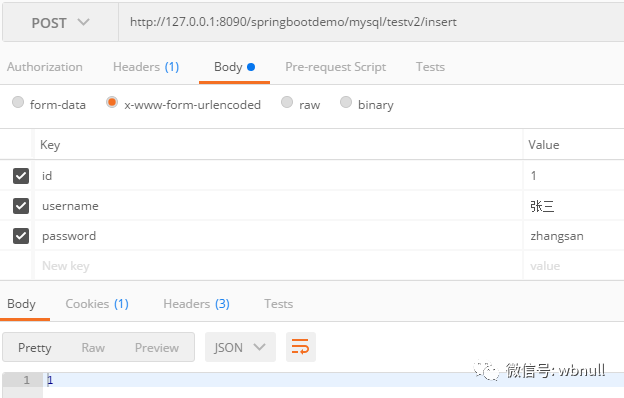
Postman接收到输出为1,表示成功,我们去查下数据库
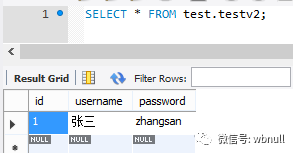
数据成功插入
这样,对于大量的数据库表,我们就可以使用Generator来生成基本的代码,然后自己再添加其他所需要的代码即可。
GitHub:https://github.com/dkbnull/SpringBootDemo
CSDN:https://blog.csdn.net/dkbnull/article/details/87278817
本篇文章来源于微信公众号: 程序员null
微信扫描下方的二维码阅读本文

Comments NOTHING