

本文大纲
-
前言
-
前后端未分离的验证码登录方案
-
验证码生成流程如下
-
登录验证流程如下
-
前后端分离的验证码登录方案
-
验证码生成流程如下
-
登录验证流程如下
-
动手撸轮子
-
Kaptcha介绍
-
新建项目并加入依赖
-
验证码获取和查看
前言
为了防止世界被破坏,为了守护世界的和平。。。说错了,重来~
为了防止验证系统被暴力破解,很多系统都增加了验证码效验,比较常见的就是图片二维码,业内比较安全的是短信验证码,当然还有一些拼图验证码,加入人工智能的二维码等等,我们今天的主题就是前后端分离的图片二维码登录方案。
前后端未分离的验证码登录方案
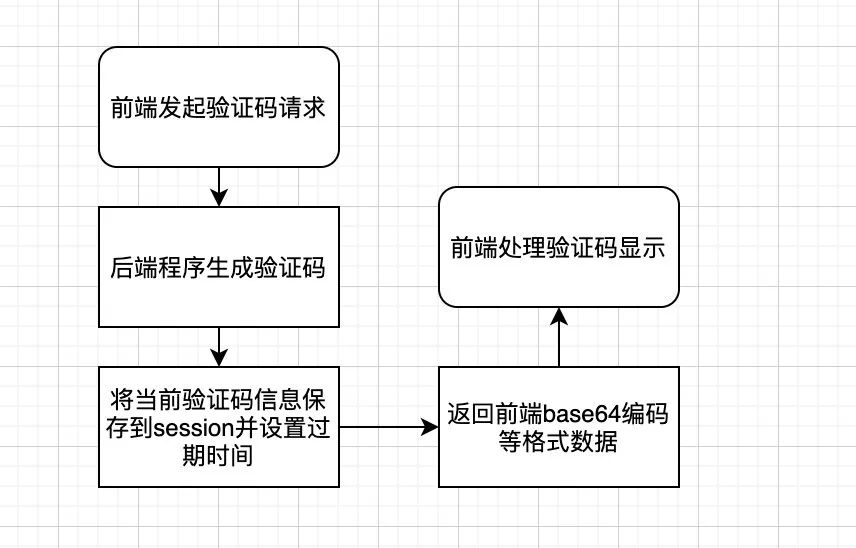
传统的项目大都是基于session交互的,前后端都在一个项目里面,比如传统的SSH项目或者一些JSP系统,当前端页面触发到获取验证码请求,可以将验证码里面的信息存在上下文中,所以登录的时候只需要用户名、密码、验证码即可。
验证码生成流程如下
登录验证流程如下
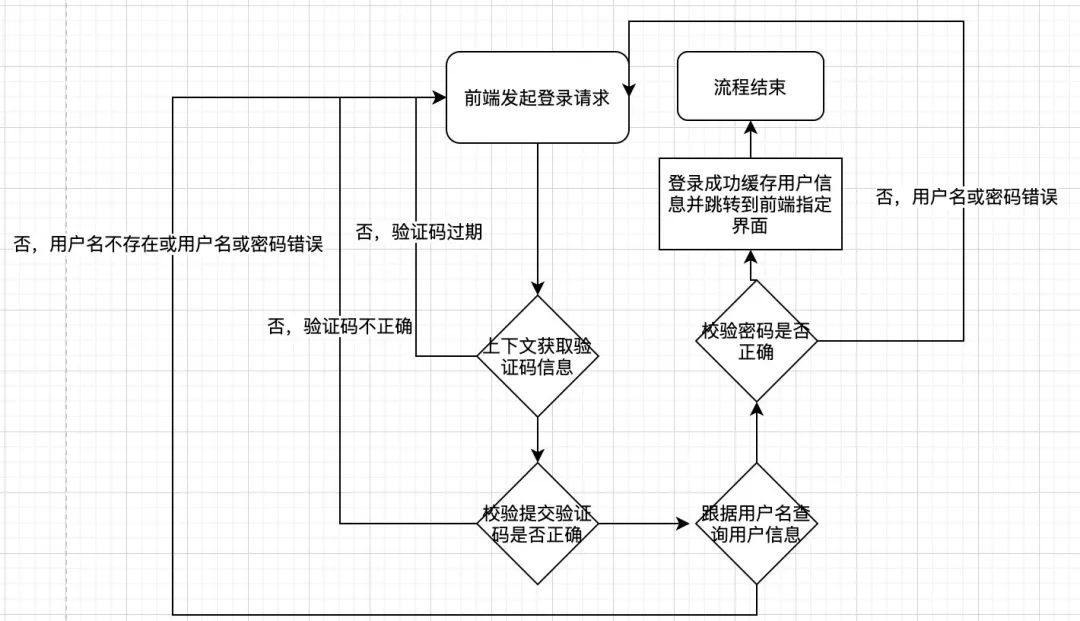
可以发现,整个登录流程还是依赖session上下文的,并且由后端调整页面。
前后端分离的验证码登录方案
随着系统和业务的不停升级,前后端代码放在一起的项目越来越臃肿,已经无法快速迭代和职责区分了,于是纷纷投入了前后端分离的怀抱,发现代码和职责分离以后,开发效率越来越高了,功能迭代还越来越快,但是以前的验证码登录方案就要更改了。
验证码生成流程如下
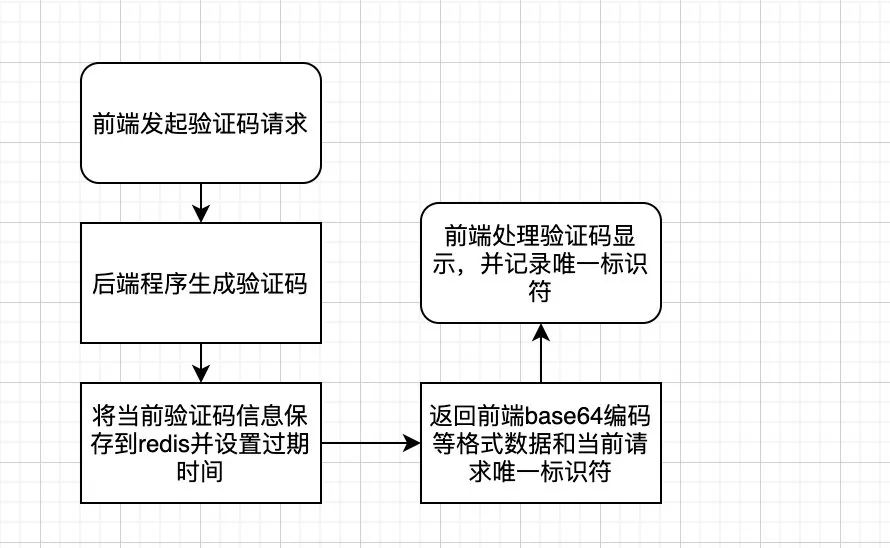
对比原来的方案,增加了redis中间件,不再是存在session里面了,但是后面怎么区分这个验证码是这个请求生成的呢?所以我们加入了唯一标识符来区分
登录验证流程如下
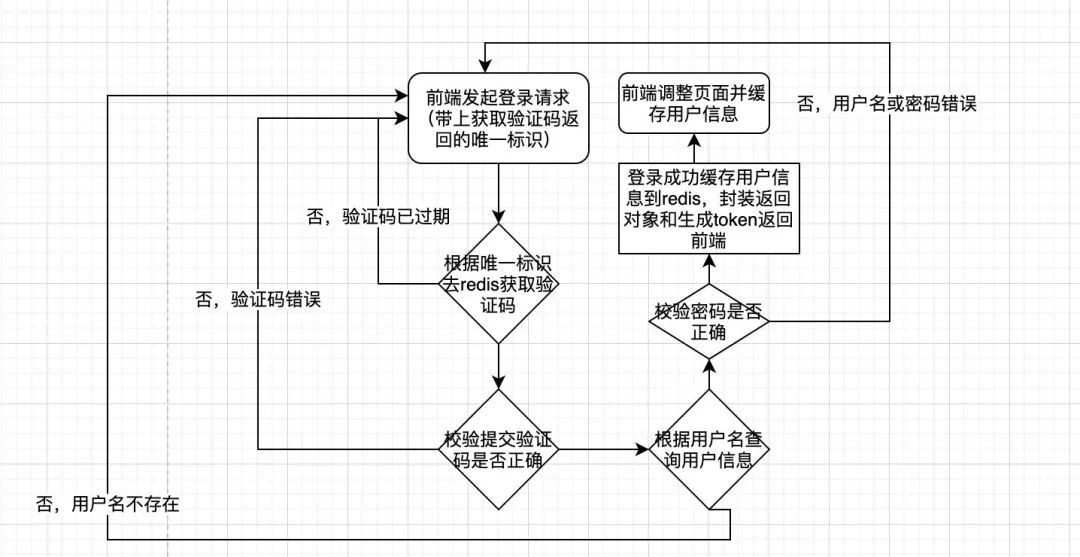
可以发现,基于前后端分离的分布式项目登录方案对比原来,加了一个redis中间件和token返回,不再依赖上下文session,并且页面调整也是由后端换到了前端
动手撸轮子
基于验证码的轮子还是挺多的,本文就以Kaptcha这个项目为例,通过springboot项目集成Kaptcha来实现验证码生成和登录方案。
Kaptcha介绍
Kaptcha是一个基于SimpleCaptcha的验证码开源项目
我找的这个轮子是基于SimpleCaptcha二次封装的,maven依赖如下
<!--Kaptcha是一个基于SimpleCaptcha的验证码开源项目--><dependency><groupId>com.github.penggle</groupId><artifactId>kaptcha</artifactId><version>2.3.2</version></dependency>新建项目并加入依赖
依赖主要有 SpringBoot、Kaptcha、Redis
pom.xml
<?xmlversion="1.0"encoding="UTF-8"?><projectxmlns="http://maven.apache.org/POM/4.0.0"xmlns:xsi="http://www.w3.org/2001/XMLSchema-instance"xsi:schemaLocation="http://maven.apache.org/POM/4.0.0http://maven.apache.org/xsd/maven-4.0.0.xsd"><modelVersion>4.0.0</modelVersion><groupId>com.lzp</groupId><artifactId>kaptcha</artifactId><version>1.0-SNAPSHOT</version><parent><groupId>org.springframework.boot</groupId><artifactId>spring-boot-starter-parent</artifactId><version>2.3.0.RELEASE</version><relativePath/><!--lookupparentfromrepository--></parent><dependencies><!--Kaptcha是一个基于SimpleCaptcha的验证码开源项目--><dependency><groupId>com.github.penggle</groupId><artifactId>kaptcha</artifactId><version>2.3.2</version></dependency><dependency><groupId>org.springframework.boot</groupId><artifactId>spring-boot-starter-web</artifactId></dependency><dependency><groupId>org.springframework.boot</groupId><artifactId>spring-boot-starter-data-redis</artifactId></dependency><!--redis依赖commons-pool这个依赖一定要添加--><dependency><groupId>org.apache.commons</groupId><artifactId>commons-pool2</artifactId></dependency><dependency><groupId>com.alibaba</groupId><artifactId>fastjson</artifactId><version>1.2.3</version></dependency><dependency><groupId>com.fasterxml.jackson.core</groupId><artifactId>jackson-databind</artifactId></dependency></dependencies><build><plugins><plugin><groupId>org.springframework.boot</groupId><artifactId>spring-boot-maven-plugin</artifactId></plugin></plugins></build></project>Redis配置类RedisConfig
@ConfigurationpublicclassRedisConfig{@BeanpublicRedisTemplate<String,Object>redisTemplate(LettuceConnectionFactoryredisConnectionFactory){RedisTemplate<String,Object>redisTemplate=newRedisTemplate<String,Object>();redisTemplate.setKeySerializer(newStringRedisSerializer());redisTemplate.setValueSerializer(newGenericJackson2JsonRedisSerializer());redisTemplate.setHashKeySerializer(newStringRedisSerializer());redisTemplate.setHashValueSerializer(newGenericJackson2JsonRedisSerializer());redisTemplate.setConnectionFactory(redisConnectionFactory);returnredisTemplate;}}验证码配置类KaptchaConfig
@ConfigurationpublicclassKaptchaConfig{@BeanpublicDefaultKaptchaproducer(){DefaultKaptchadefaultKaptcha=newDefaultKaptcha();Propertiesproperties=newProperties();properties.setProperty("kaptcha.border","no");properties.setProperty("kaptcha.border.color","105,179,90");properties.setProperty("kaptcha.textproducer.font.color","black");properties.setProperty("kaptcha.image.width","110");properties.setProperty("kaptcha.image.height","40");properties.setProperty("kaptcha.textproducer.char.string","23456789abcdefghkmnpqrstuvwxyzABCDEFGHKMNPRSTUVWXYZ");properties.setProperty("kaptcha.textproducer.font.size","30");properties.setProperty("kaptcha.textproducer.char.space","3");properties.setProperty("kaptcha.session.key","code");properties.setProperty("kaptcha.textproducer.char.length","4");properties.setProperty("kaptcha.textproducer.font.names","宋体,楷体,微软雅黑");//properties.setProperty("kaptcha.obscurificator.impl","com.xxx");可以重写实现类properties.setProperty("kaptcha.noise.impl","com.google.code.kaptcha.impl.NoNoise");Configconfig=newConfig(properties);defaultKaptcha.setConfig(config);returndefaultKaptcha;}验证码控制层CaptchaController
为了方便代码写一块了,讲究看
packagecom.lzp.kaptcha.controller;importcom.google.code.kaptcha.impl.DefaultKaptcha;importcom.lzp.kaptcha.service.CaptchaService;importcom.lzp.kaptcha.vo.CaptchaVO;importorg.springframework.beans.factory.annotation.Autowired;importorg.springframework.web.bind.annotation.GetMapping;importorg.springframework.web.bind.annotation.RequestMapping;importorg.springframework.web.bind.annotation.ResponseBody;importorg.springframework.web.bind.annotation.RestController;importsun.misc.BASE64Encoder;importjavax.imageio.ImageIO;importjava.awt.image.BufferedImage;importjava.io.ByteArrayOutputStream;importjava.io.IOException;@RestController@RequestMapping("/captcha")publicclassCaptchaController{@AutowiredprivateDefaultKaptchaproducer;@AutowiredprivateCaptchaServicecaptchaService;@ResponseBody@GetMapping("/get")publicCaptchaVOgetCaptcha()throwsIOException{//生成文字验证码Stringcontent=producer.createText();//生成图片验证码ByteArrayOutputStreamoutputStream=null;BufferedImageimage=producer.createImage(content);outputStream=newByteArrayOutputStream();ImageIO.write(image,"jpg",outputStream);//对字节数组Base64编码BASE64Encoderencoder=newBASE64Encoder();Stringstr="data:image/jpeg;base64,";Stringbase64Img=str+encoder.encode(outputStream.toByteArray()).replace("n","").replace("r","");CaptchaVOcaptchaVO=captchaService.cacheCaptcha(content);captchaVO.setBase64Img(base64Img);returncaptchaVO;}}验证码返回对象CaptchaVO
packagecom.lzp.kaptcha.vo;publicclassCaptchaVO{/***验证码标识符*/privateStringcaptchaKey;/***验证码过期时间*/privateLongexpire;/***base64字符串*/privateStringbase64Img;publicStringgetCaptchaKey(){returncaptchaKey;}publicvoidsetCaptchaKey(StringcaptchaKey){this.captchaKey=captchaKey;}publicLonggetExpire(){returnexpire;}publicvoidsetExpire(Longexpire){this.expire=expire;}publicStringgetBase64Img(){returnbase64Img;}publicvoidsetBase64Img(Stringbase64Img){this.base64Img=base64Img;}}Redis封装类RedisUtils
网上随意找的,类里面注明来源,将就用,代码较多就不贴了,文末有代码获取
验证码方法层CaptchaService
packagecom.lzp.kaptcha.service;importcom.lzp.kaptcha.utils.RedisUtils;importcom.lzp.kaptcha.vo.CaptchaVO;importorg.springframework.beans.factory.annotation.Autowired;importorg.springframework.beans.factory.annotation.Value;importorg.springframework.stereotype.Service;importjava.util.UUID;@ServicepublicclassCaptchaService{@Value("${server.session.timeout:300}")privateLongtimeout;@AutowiredprivateRedisUtilsredisUtils;privatefinalStringCAPTCHA_KEY="captcha:verification:";publicCaptchaVOcacheCaptcha(Stringcaptcha){//生成一个随机标识符StringcaptchaKey=UUID.randomUUID().toString();//缓存验证码并设置过期时间redisUtils.set(CAPTCHA_KEY.concat(captchaKey),captcha,timeout);CaptchaVOcaptchaVO=newCaptchaVO();captchaVO.setCaptchaKey(captchaKey);captchaVO.setExpire(timeout);returncaptchaVO;}}用户登录对象封装LoginDTO
packagecom.lzp.kaptcha.dto;publicclassLoginDTO{privateStringuserName;privateStringpwd;privateStringcaptchaKey;privateStringcaptcha;publicStringgetUserName(){returnuserName;}publicvoidsetUserName(StringuserName){this.userName=userName;}publicStringgetPwd(){returnpwd;}publicvoidsetPwd(Stringpwd){this.pwd=pwd;}publicStringgetCaptchaKey(){returncaptchaKey;}publicvoidsetCaptchaKey(StringcaptchaKey){this.captchaKey=captchaKey;}publicStringgetCaptcha(){returncaptcha;}publicvoidsetCaptcha(Stringcaptcha){this.captcha=captcha;}}登录控制层UserController
这块我写逻辑代码了,相信大家都看的懂
packagecom.lzp.kaptcha.controller;importcom.lzp.kaptcha.dto.LoginDTO;importcom.lzp.kaptcha.utils.RedisUtils;importcom.lzp.kaptcha.vo.UserVO;importorg.springframework.beans.factory.annotation.Autowired;importorg.springframework.web.bind.annotation.PostMapping;importorg.springframework.web.bind.annotation.RequestBody;importorg.springframework.web.bind.annotation.RequestMapping;importorg.springframework.web.bind.annotation.RestController;@RestController@RequestMapping("/user")publicclassUserController{@AutowiredprivateRedisUtilsredisUtils;@PostMapping("/login")publicUserVOlogin(@RequestBodyLoginDTOloginDTO){Objectcaptch=redisUtils.get(loginDTO.getCaptchaKey());if(captch==null){//throw验证码已过期}if(!loginDTO.getCaptcha().equals(captch)){//throw验证码错误}//查询用户信息//判断用户是否存在不存在抛出用户名密码错误//判断密码是否正确,不正确抛出用户名密码错误//构造返回到前端的用户对象并封装信息和生成tokenreturnnewUserVO();}}验证码获取和查看
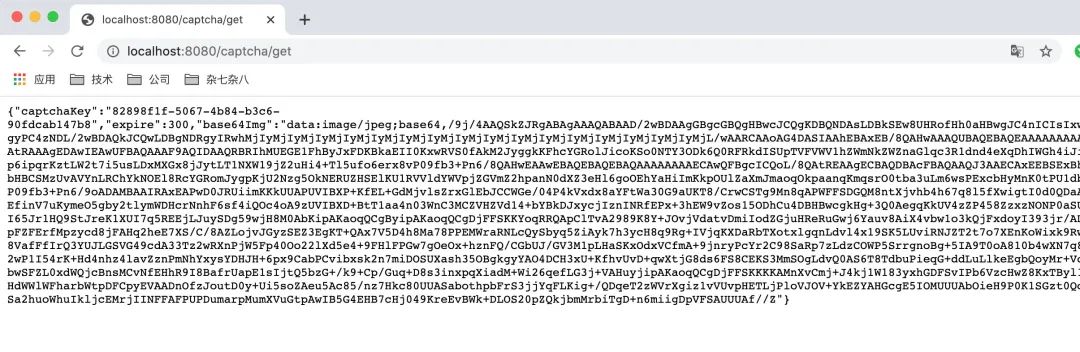
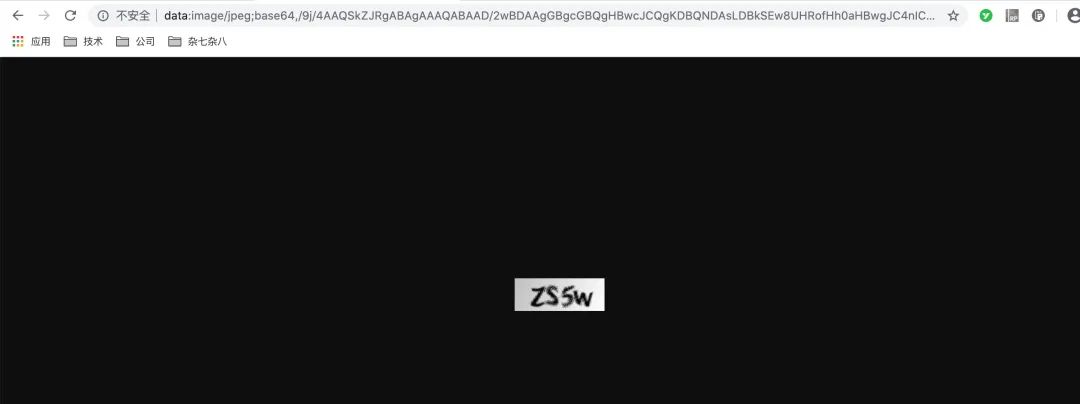
来源|码畜君
后端专属技术群 构建高质量的技术交流社群,欢迎从事编程开发、技术招聘HR进群,也欢迎大家分享自己公司的内推信息,相互帮助,一起进步!
文明发言,以
交流技术、职位内推、行业探讨为主广告人士勿入,切勿轻信私聊,防止被骗
加我好友,拉你进群

本篇文章来源于微信公众号: Java面试题精选
微信扫描下方的二维码阅读本文

Comments NOTHING